### About us
Since 2021, Defined users have relied on industry leading blockchain data and analytics tools to get an edge in crypto trading.
Defined now brings every on-chain market into one interface: tokens, perpetuals (via Hyperliquid), prediction markets (via Polymarket and Kalshi), and sports. You trade everything in USDC across any supported chain, and we handle the routing so you never need to bridge. Defined uses Relay for trading and Turnkey for authentication, so your experience stays fast and secure. There is also a companion iOS and Android app that shares your account, wallets, data, and assets.
### No paid trending
Defined has never had paid trending. If a token is trending, it is because of its on-chain metrics, not because someone paid to be there. We do not let creators or users pay to appear on a trending list or insert scam links. Trending stays organic.
### Where we get our data
Defined is powered by our Codex API, and [TradingView](https://www.tradingview.com/) for charts. Want to use our data for your project? Check out [Codex.io](https://codex.io/?utm_source=defined\&utm_medium=docs\&utm_campaign=welcome-page) for more details.
The most reliable and accurate blockchain API
### Trading fees
* **Spot**: 0.5%
* **Perps**: 0.025%
* **Predictions**: 0.25%
Spot orders start at $5, and a minimum fee of $0.25 applies per order. The minimum fee only affects orders under $50.
Find more information on fees, referrals, and rewards [here](/defined-docs/readme/account-management/referrals).
### Mobile app
Defined is available on iOS and Android at [mobile.defined.fi](https://mobile.defined.fi/rgBf/wgklaiy3). The app shares the same account, wallets, and cash balance as the web platform, so you can trade tokens, perps, and predictions on the go.
{% hint style="info" %}
Coming from Defined Classic? The old app and your existing wallets stay available at [un.defined.fi](https://un.defined.fi), and its docs remain in the sidebar under **Defined (Classic)**. To use the new Defined, create a new account and wallets at [defined.fi](https://defined.fi/?utm_source=defined\&utm_medium=docs\&utm_campaign=welcome-page), then transfer your assets over. You can export your watchlists from Classic and import them into Defined.
{% endhint %}
# Quick Start Guide
Set up your account and understand the basics
{% stepper %}
{% step %}
### Create Your Account
You can create your account by logging in via email, Google, Apple, or X.
You can add additional methods at a later time
Once logged in, an EVM and Solana wallet are generated for you.
You may export the private keys for each wallet at your discretion. Do not share these with anyone.
{% hint style="info" %}
Your Defined account is also linked to the Defined Mobile app (iOS/Android), with the same wallets. Your cash balance is shared between both platforms.
{% endhint %}
{% endstep %}
{% step %}
### Fund Your Account
To deposit funds for token trading, select the wallet icon () on the nav bar and select "Add funds" to start the deposit flow. We use Relay to handle a "Cash Balance" on your account to simplify trading across all networks. Your account's cash balance is held as USDC on Solana (regardless of what network you send from) and is also available for trading when you login on the Defined Mobile app. Whenever you sell a token, you will receive USDC on Solana.
Your cash balance and wallet live in the top nav bar
**About Deposits:**
* If you initiate a crypto deposit and send yourself USDC (on any network) we will automatically convert it to USDC on SOL.
* If you deposit via Moonpay you'll receive USDC on SOL.
* If you send any other base token (Eth, Solana, etc.) to your Defined wallets via "Deposit Crypto" it will remain as that token in your portfolio.
* You will have the option to convert non-USDC tokens in your portfolio, or you can manually sell those tokens on Defined, and they will convert to USDC to fund your cash balance.
{% hint style="info" %}
Perpetuals & Predictions have region restrictions and are traded with funds separate from your Cash Balance. Follow the "Deposit" prompts on those respective trading panels to transfer funds from your Cash Balance for trading on these markets (either Hyperliquid or Polymarket).
{% endhint %}
**Funding Recommendation:**
Sending USDC on Solana is the best way to fund your Cash Balance and avoid small conversion fees. You can deposit USDC from any network and we will auto convert to USDC on Solana through the deposit flow on web/mobile.
{% endstep %}
{% step %}
### Discover Trending Tokens
Open the [Tokens dashboard](https://defined.fi/tokens?utm_source=defined\&utm_medium=docs\&utm_campaign=quick-start-guide) to see what's trending right now. Trending is driven entirely by on-chain activity, so tokens rank by real trading, not paid placement. Filter by network, timeframe, and preset (Trending, Volume, Gainers, New), or browse by category to find opportunities in a theme.
The Tokens dashboard is your starting point for discovery
Click any token to open its full profile with chart, transactions, holders, and a trade panel. Use the search bar at the top to jump to any token by name, symbol, or contract address across 80+ million tokens on 40+ networks.
{% endstep %}
{% step %}
### Make Your First Trade
Once your cash balance is funded, trading a token takes seconds. Open any token, enter your spend amount in the buy panel (orders start at $5), and hit "Buy" for an instant market order. You can also set limit and stop orders and adjust slippage from the same panel.
Buy panel with your current position
All trades settle in USDC on Solana, and you can trade across any supported chain without bridging. For a full breakdown of order types, fees, and gas, see the [Trading](/defined-docs/readme/trading) page.
{% endstep %}
{% step %}
### Explore More Markets and Features
Token trading is just the start. From the left sidebar you can also trade [Perps](/defined-docs/readme/discovery-and-search/perps), [Predictions](/defined-docs/readme/discovery-and-search/predictions), and Sports, track top [Traders](/defined-docs/readme/discovery-and-search/traders), and manage your [watchlists](/defined-docs/readme/discovery-and-search/tokens#watchlists).
Prefer a fully customizable, multi-panel layout? Advanced users can build [custom Boards](/defined-docs/readme/introduction-to-boards) that combine discovery, charts, trading, and more into a single view.
{% endstep %}
{% endstepper %}
# Account Management
General Account Info, Wallets, Settings, Referrals & more
### Account settings and profile
The Account panel is where you can find your user ID and manage your sign-in methods.
Add or remove sign-in methods
### Managing wallets (EVM and Solana by default)
Your account will auto-generate two wallets on sign-up, one EVM and one Solana. During the initial deposit flow, you will transfer to one of these addresses. Your Cash Balance (USDC) will be held in your Solana wallet and any trades you make will originate from that wallet (regardless of network). Any token you sell, on any network, will also convert to USDC on Solana and be added to your Cash Balance.
You may export () the private keys for each wallet at your discretion. Do not share these with anyone.
### Withdrawing funds
You can withdraw from your Cash Balance at any time. Open the wallet menu in the top nav bar and select "Withdraw", then choose the token and destination address. Withdrawals are sent on-chain from your Defined wallets.
### App settings and preferences
Color themes, general settings, and keyboard shortcuts are found in this panel. You can also open settings from anywhere by clicking the settings button in the top nav bar.
### Notifications
Defined keeps you posted on web and the mobile app. You'll get notifications for tracked trader activity, price movements, order fills, XP earned, and other account activity.
# Referrals & Rewards
Earn a share of trading fees from your referrals, plus XP rewards for your activity
## Referrals
Refer other traders to Defined and earn a share of their trading fees. You can earn 30% of trading fees collected from your direct referrals, plus other incentives to be announced at a later date. No caps. No expirations.
Grab your personalized invite link from your [referrals page](https://www.defined.fi/account/referrals?utm_source=defined\&utm_medium=docs\&utm_campaign=referrals) and share it anywhere. Anyone who signs up through your link is attributed to you.
Copy and share your personal referral link from the referrals page
{% hint style="info" %}
Referrals are attributed based on a last click basis. Only the most recent click before sign-up leads to a referral.
{% endhint %}
Trading fee breakdown:
* **Spot**: 0.5%
* **Perps**: 0.025%
* **Predictions**: 0.25%
## Rewards
Defined rewards your activity with XP. The more you trade and engage on Defined, the more XP you earn, tracked over time on your rewards page. Your referrals contribute to your rewards too.
{% hint style="info" %}
Rewards are currently in testing and will be available to all users soon.
{% endhint %}
Track your XP and rewards over time
# Discovery & Search
On Defined, you can discover tokens, perps, predictions, traders, and more.
# Tokens
Discover trending tokens and find trading opportunities on any chain.
Defined's token discovery uses algorithm-driven trending with no paid placements. Tokens rank based on actual trading activity, not who paid for promotion.
#### Discovering Tokens
Add a **Discover Tokens** panel to any board to browse trending tokens (or use our [default](https://defined.fi/boards?utm_source=defined\&utm_medium=docs\&utm_campaign=tokens) boards). Click any token to view its full profile, chart, transactions, holders, and any other info applicable to linked token panels.
Filter by:
* **Network** - Ethereum, Solana, Base, and dozens of other chains
* **Timeframe** - 5m, 1h, 4h, 12h, or 24h resolutions
* **Defined Presets** - Choose from Trending, Volume, Gainers, and New tokens
* **Custom filters** - filter  by any metric you want with our custom token filtering:
* **Categories** - browse tokens grouped by category and narrative to find opportunities in a specific theme.
#### Searching for Tokens
Use the search bar along the top nav bar, in the Discover Tokens panel, or by clicking any panel tab, to find specific tokens by name, symbol, or contract address. Search across 80+ million tokens on all 40+ supported networks.
#### Watchlists
Create custom watchlists to organize tokens you're tracking. Add tokens from any discovery panel or search results by clicking the star icon (). Your watchlists appear in the left sidebar for quick access, and can also be added as panels to any board.
Watchlists in the left sidebar
# Launchpads
Discover new token launches in real-time across many popular launchpad platforms.
Our Launchpads panel allows you to monitor tokens launching on all major launchpads to catch early opportunities. See launch metrics, initial liquidity, and initial trading activity. Plus, add and link any other panels with additional token info or trading options to enhance your launchpad specific board.
#### Discovering Launches
Add a **Token Launchpads** panel to browse active and upcoming launches. Filter by:
* **Launchpad platform** - Different platforms have different launch mechanics
* **Network** - Find launches on your preferred chains
* **Status** - Active, upcoming, or completed launches
* **Filters** - Use our default "New", "Completing", "Completed" filters, or set your own to narrow your launchpad results for each column.
Launchpad memescope
#### Launch Data
Each launch shows:
* Token Age and Graduation % indicator
* Initial market cap and liquidity
* Early price action
* Holder count
* Platform and network details
Click any token to trade or view additional details in other linked panels.
# Traders
Discover and track successful wallets to follow smart money moves.
Track high-performing traders to see what they're buying, when they're selling, and how they're managing positions. Learn from their strategies and find patterns you can monetize.
#### Discovering Traders
Add a **Discover Traders** panel to browse top-performing wallets (or use our [default](https://defined.fi/boards?utm_source=defined\&utm_medium=docs\&utm_campaign=traders) boards). Filter by:
* **Performance metrics** - Win rate, profit/loss, total volume
* **Network** - Find traders who perform well on specific chains
* **Time period** - Recent performance vs all-time stats
* **Strategy** - Identify traders focused on specific token types or trading styles
Click any trader to view their full profile, trading history, and current holdings.
#### Tracking Wallet Activity
Click the star icon next to any trader profile to track them. Once tracked, you'll see their activity in real time in the **Tracked Traders** feed on the left sidebar, so you can follow their buys and sells as they happen.
Tracked traders and their live activity in the left sidebar
You'll also get notifications on web and the mobile app when your tracked traders make moves. See [Notifications](/defined-docs/readme/account-management#notifications) for more.
#### Wallet Labels
Wallets are labelled in several categories based on trading behavior and other indicators, such as total asset value. Stats for Scammer and Bot wallets are not tracked. If a wallet is incorrectly labelled as a bot, we can adjust and backfill information for those wallets on a case-by-case basis.
* **Wealthy (low):** Wallet holds $1M+ in assets
* **Wealthy (Medium):** Wallet holds $5M+ in assets
* **Wealthy (high):** Wallet holds $10M+ in assets
* **Sniper:** Profits $3k+ from tokens bought within 1 hour of launch
* **Interesting:** —REDACTED—
* **Early Bird (Smart Trader):** Profits $5k+ from tokens 1 hour to 2 days old
* **Second Wave (Smart Trader):** Profits $7.5k+from established tokens (2+ days old)
* **Scammer or Bot**: Wallets that have suspicious trading behavior. Stats not tracked.
#### Analyzing Wallets
Add these panels to analyze specific traders:
* **Trader Activity** - On-chain trades
* **Trader Holdings** - Current token positions
* **Trader Stats** - Volume and activity per network
* **Trader Heatmap** - Visual P\&L & volume over time
* **PNL Chart** - Profit and loss over time
* **Trader Summary** - Profile overview and key stats
#### Searching for Wallets
Know a specific wallet address you want to track? Paste it into the search bar to pull up their complete profile and activity. Works with any EVM or Solana address.
# Perps
Discover perpetual contracts and trade with leverage using Hyperliquid.
Access Hyperliquid's perpetuals market directly from Defined. Trade with leverage, manage positions, and view real-time market data all in one interface.
#### Discovering Perpetual Assets
Add a **Discover Perpetual Assets** panel to browse available contracts (or use our [defaults](https://defined.fi/boards?utm_source=defined\&utm_medium=docs\&utm_campaign=perps)). Filter by:
* **Trending** - Most active contracts by volume
* **Watchlists** - Your saved perps
* **Asset type** - Major crypto assets, altcoins, and more
Click any asset to view its perpetual chart, order book, and trading interface.
#### Trading Perps
Add these panels to trade perpetuals:
* **Trade** - Execute market and limit orders with leverage
* **Perpetual Chart** - Interactive chart with real-time data
* **Order Book** - Live order book and recent trades
* **Positions** - Manage open positions with real-time P\&L
* **Open Orders** - Track and cancel pending orders
#### Understanding Leverage
Perpetuals allow you to trade with leverage, meaning you can control larger positions with less capital. Higher leverage means higher risk;your position can be liquidated if the market moves against you.
Start with lower leverage (2x-5x) until you're comfortable with how perps work.
# Predictions
Discover real-world trending prediction events from Polymarket and Kalshi.
Trade on outcomes of elections, sports events, crypto milestones, and more. Defined allows users to discover Polymarket & Kalshi hosted market-driven probability forecasts, in a unified predictions interface.
#### Discovering Events
Add a **Discover Polymarket (or Kalshi) Events** panel to browse active markets. Filter by:
* **Trending** - Most active events by volume
* **Category** - Politics, sports, crypto, entertainment, etc.
* **Watchlists** - Events you're following
Click any event to see available markets, current odds, and trading activity.
#### Trading Predictions
Add these panels to trade prediction markets:
* **Predictions Markets** - List of available outcomes for an event
* **Predictions Trade** - Place bets on specific outcomes
* **Predictions Event Chart** - Probability changes over time
* **Predictions Order Book** - Real-time order book
* **Predictions Positions** - Track your open positions and P\&L
#### How It Works
Prediction markets let you buy shares representing different outcomes. Shares pay $1 if that outcome occurs, $0 if it doesn't. Current prices reflect market consensus on probability.
Example: If "Yes" shares trade at $0.65, the market estimates a 65% chance that outcome happens.
#### Sports
Defined brings sports markets into the same interface. Browse games and events, follow live odds, and trade outcomes in USDC right alongside prediction markets. Sports coverage is still expanding as we add more leagues and event types.
# Trading
How to execute trades across all asset types
Defined allows you to trade tokens, perps, and predictions in one unified interface using market specific boards and trading panels.
#### **Funding Your Account**
* Our [Quick Start Guide](/defined-docs/readme/quick-start-guide) goes through our deposit flow for your USDC cash balance (used for token trading via Relay).
* Transfer funds to Hyperliquid or Polymarket to trade Perps and Prediction markets by selecting "Deposit" on respective trading panels for those markets.
#### **Token Trading**
* **Market orders**
* allow for instant execution at the current price. Simply select your spend amount and hit "Buy".
* Adjust slippage by selecting the "Auto" at the bottom of the trading panel and selecting "Custom" to enter a preferred amount. Higher slippage will prevent trading errors for highly volatile tokens.
Buy panel with your current position
* **Limit & Stop orders**
* Set a price you would like your order to trigger at (above or below depending on Limit or Stop order).
* Set an expiry date.
* Manage your orders in the Orders panel
Sell panel with a limit order and your current position
* **Understanding fees and gas**
* **Hovering order the fee indicator (**) will give you a breakdown of gas-fees, Relay fees, and Defined (app) fees if applicable.
* Our standard trading fee on Defined is 0.5% on top of any fees imposed by Relay.
* The minimum order size is $5.
* A $0.25 minimum fee applies per order (this only affects orders under $50).
* Defined sponsors gas fees whenever possible. In rare occasions, a gas top-up may be required on new networks when you make your first trade, but we handle this for you automatically.
* Our trading fees allow us to cover your gas fees, priority fees, and allow you to seamlessly trade cross-chain on any network without having to bridge. This ultimately saves our users money over the lifetime of their trading journey compared to other apps/trading terminals.
* Note: All trades are settled in USDC on Solana
Monitor your open positions and orders at any time from the Positions quick view in the top nav bar.
Open positions from the top nav bar
#### **Perpetuals Trading**
* Perpetuals allow you to trade based on whether you believe an asset price will rise (long), or fall (short).
* **Market orders**
* Execute instantly at current price. Select leverage (up to 20x), enter your position size, and hit "Buy" or "Sell"
* **Limit orders**
* Set a trigger price where you want your position to open. Your order executes when the market hits that price. Unlike Token limit orders, Hyperliquid will fill at the exact price you set and not "at or below".
* **Leverage**
* Allows you to trade with more capital than you have deposited. Higher leverage = higher potential profit AND risk. Start low (2x-5x) until comfortable.
* **Important!** Positions can be liquidated if price moves against you. Watch your liquidation price and manage risk carefully.
The higher the leverage, the more likely you can be liquidated if the price moves in the opposite direction of your trade.
#### **Prediction Markets Trading**
* Trade on the outcomes of real-world events using prediction markets. See the [Predictions](/defined-docs/readme/discovery-and-search/predictions) page for how to discover events, read the odds, and place trades.
# Introduction to Boards
Your customizable trading workspace
{% hint style="info" %}
Boards are an advanced, optional way to customize Defined. You can use everything Defined offers from the default layout, and explore Boards whenever you want a workspace tailored to how you trade.
{% endhint %}
Quick demo of creating a token discovery board with linked & grouped panels
### **What Are Boards?**
* Boards are your canvas to create a customized trading and discovery interface for any and all markets.
* Comprised of panels, boards allow you to add data and UI functions from several categories including tokens, traders, predictions, perpetuals, trading, and more. Add, remove, and resize all of your panels to create your ideal board.
* Boards can also be shared with the Defined community by making them public. Public boards are searchable by other users and you can also share them via personalized links. Users cannot edit your public board, but they may save a copy to their boards page.
### **Default & Community Boards**
* We've created a number of default boards that are added to the "[Your Boards](https://defined.fi/boards/yours?utm_source=defined\&utm_medium=docs\&utm_campaign=introduction-to-boards)" page on your first login. These are a great starting point to jump into our modular board experience and start playing around with editing panels.
* On the "[Community Boards](https://defined.fi/boards?utm_source=defined\&utm_medium=docs\&utm_campaign=introduction-to-boards)" page, you'll be able to see all boards that have been publicly shared by other users, in addition to the default boards. You can search and sort these boards to find inspiration from other users.
* Track () any board to add it to your sidebar and see any changes made by the creator in the future.
* Save a copy of any default or community boards () to make your own changes (you will no longer see updates made by the original creator).
Browse boards shared by the Defined team and community
### **Creating Boards**
* [Your Boards](https://defined.fi/boards/yours?utm_source=defined\&utm_medium=docs\&utm_campaign=introduction-to-boards) page will include all of the default boards, boards you have saved and made edits to, as well as any boards you create from scratch.
* To create a new board, simply select the "+" next to "Your Boards" in the side bar navigation.
* Next, you will add all the panels that you need for your board, so you'll want to have an idea of what information you want to display. Are you building a tokens board? Traders? Perps? Predictions? A combination?
* Panels are the building blocks of boards. Boards can contain panels of different types, such as tokens, traders, prediction markets, and more. All of our panels are organized in categories, plus you can search all available panels by keyword or description. To learn more about panels and how boards work, we recommend going through our Academy mode described below.
### Defined Academy
* Prefer a more interactive tutorial? Check out our Academy mode located in the bottom left side-bar of [defined.fi](https://defined.fi/boards/yours?utm_source=defined\&utm_medium=docs\&utm_campaign=introduction-to-boards). When toggled, it will populate a list of board tutorials you can interact with.
* This self-guided tutorial will teach you about core concepts of boards, adding and linking panels, as well as saving and sharing boards, all within an interactive learning environment. We'll add more academy boards over time as new features and capabilities are released.
# Tips & Tricks
All the trading tools you need in one customizable workspace
**Tips & Tricks**
* Transaction filtering from chart clicks
* Editing token info
* Keyboard shortcuts (if any)
* Panel linking workflows
* Hidden panel features
* Board organization strategies
* Drag & drop capabilities
* searching a token within a penl (chart for example)
This is an overview of some our most popular panels and features and is not an exhaustive list.
### Tokens
Discover Tokens - Algorithm-driven trending tokens with custom filters & watchlist monitoringTradingView Charts & Token Transactions - Fast charts and wide-range of transaction filtersToken Bubblemaps - At-a-glance holder distributionHolders & Top Traders - View all token holders and a list of the best traders
### Traders
Discover Traders - Find top traders/wallets using performance based filtersTrader Activity & Holdings - View trading activity and current holdingsPnL Chart - Visualize a trader's profit and loss over timeTracked Trader Feed - See trading activity from all tracked wallets
### Perpetuals
Discover Perpetual Assets - Find trending assets & view watchlistsOrder Book - real-time order book and tradesPnL Chart - Visualize a trader's profit and loss over timeTracked Trader Feed - See trading activity from all tracked wallets
*What you can add to your boards*
**Token Discovery**
* Discover Tokens panel
* Trending and filters (network, timeframe, market cap, volume)
* Token detail view (summary, chart, stats, transactions)
* Search functionality
**Token Trading**
* Trading tokens from panels
* How Relay works (USDC funding)
* Market orders and limit orders
* Understanding slippage and routing
**Perpetuals (Perps)**
* Perpetual assets panel
* Understanding perps
* Trading perps
* Managing positions
**Prediction Markets**
* Polymarket event list panel
* Understanding prediction markets
* Trading on predictions
* Viewing your positions
**Launchpads**
* Launchpad tokens panel
* Tracking new launches
* Launch metrics and data
**Wallet Tracking**
* Wallet profiles panel
* Discovering wallets to track
* Following smart money
* Viewing wallet activity and transactions
**Top Traders**
* Top traders panel
* Understanding trader metrics
* Following successful traders
**Portfolio**
* Portfolio panel
* Viewing all holdings across chains
* Profit and loss tracking
* Portfolio breakdown
**Watchlists**
* Creating custom watchlists
* Adding tokens to watchlists
* Watchlist panel in boards
**Holders**
* Token holder analysis panel
* Understanding holder distribution
* Tracking holder changes
**Transactions**
* Transaction filtering panel
* Understanding transaction types
* Tracking specific transaction activity
# FAQ
Before reaching out to our support team, first review our list of frequently asked questions.
How do I build boards and link panels?
Defined's modular board system lets you create custom layouts with linked panels. For a step-by-step guide on building boards, adding panels, and linking them together, check out **Academy mode** which will walk you through everything interactively. You can find and activate it in the bottom left of the sidebar:
Can I connect and trade with a different wallet?
No. Defined uses **Relay** for token trading, which creates a separate trading wallet funded with USDC. You can deposit USDC from any wallet to your Defined Solana wallet, or use MoonPay to buy USDC directly.
How does the mobile app work with Defined?
The Defined mobile app and Defined (desktop) share the same account and wallets. Boards created on desktop don't sync to mobile as they operate differently, but your funds, watchlists, tracked wallets, and portfolio are shared across both platforms.
Download the app at [mobile.defined.fi](https://mobile.defined.fi/rgBf/wgklaiy3).
Do I need gas to trade?
Rarely. Defined sponsors transactions on Ethereum, Base, and Polygon (gasless). Solana transactions use a paymaster (also gasless). For other networks, Relay automatically tops up your gas when you make your first trade on that network.
What charting solution does Defined use?
Defined uses TradingView's advanced charting library for professional-grade technical analysis. Charts include multiple timeframes, technical indicators, drawing tools, and real-time price data.
Will Defined support new networks as they launch?
Most likely, yes. Defined aims to support major networks shortly after launch (via our Data API, [Codex.io](https://codex.io/?utm_source=defined\&utm_medium=docs\&utm_campaign=FAQ). Network support is added to both the data/discovery side and the trading side as soon as possible.
How is trending calculated? Can I pay to have a token be trending?
Trending is algorithm-driven based on actual trading activity - volume, price movement, and transaction count. Unlike other platforms, Defined has **no paid placements or ads**. Tokens rank purely on market activity.
How can I report an issue or request a feature?
Use the feedback option in the app's settings menu, or [contact us](/defined-docs/contact-us) directly.
For bugs or other issues with the app or web platform, include your Defined UserID, screenshots of the issue, and describe in detail what you were doing when the issue occurred and the expected outcome.
# Defined (Classic)
These are the docs for Defined Classic, the previous version of Defined. Classic is still available at [un.defined.fi](https://un.defined.fi), but it is no longer actively updated.
{% hint style="info" %}
We recommend trying the new Defined at [defined.fi](https://defined.fi). It brings tokens, perps, predictions, and sports into one interface, lets you trade in USDC across any chain without bridging, and comes with a new iOS and Android app. Your Classic account and wallets stay at un.defined.fi. To use the new Defined, create a new account and transfer your assets over.
{% endhint %}
# Welcome to Defined
The fastest and safest multi-chain trading terminal.
## Experience the best in trading, wallet discovery and tracking, and portfolio management!
Since 2021, Defined users have benefitted from industry leading enriched blockchain data and powerful analytics tools to give them an edge in the competitive space of cryptocurrency trading. Now with integrated trading functionality, Defined brings an unparalleled all-in-one trading solution to its users. Our trading interface is designed with users in mind, maintaining a simplistic model while boasting robust wallet discovery and tracking features, the best trending token page in the industry, full portfolio management, and much more.
Trading on Defined utilizes Turnkey authentications with passkey technology, ensuring security is at the forefront of our trading and wallet infrastructure.
## What's Under the Hood?
Defined is powered by our Codex API, and [TradingView](https://www.tradingview.com/) for charts. Want to use our data for your project? Check out [Codex.io](https://www.codex.io/) for more details.
The most reliable and accurate blockchain API
## Trading Fees
Our standard trading fee is 1%.
# Getting Started
Everything you need to start trading on Defined!
## Overview
Our "Getting Started" guide will review the following topics to help you get the most out of trading on Defined:
1. [Introduction to Passkeys](/defined-docs/defined-classic/getting-started/introduction-to-passkeys)
2. [Connect to Defined](/defined-docs/defined-classic/getting-started/connect-to-defined)
3. [Create your Passkey](/defined-docs/defined-classic/getting-started/create-your-passkey)
4. [Create & Fund Wallets](/defined-docs/defined-classic/getting-started/fund-your-wallet)
5. [Manage Trading Wallets](/defined-docs/defined-classic/getting-started/manage-trading-wallets)
6. [Trade Settings](/defined-docs/defined-classic/getting-started/trade-settings)
7. [Start Trading](/defined-docs/defined-classic/getting-started/start-trading)
8. [Manage Orders](/defined-docs/defined-classic/getting-started/manage-orders)
Additionally, we will cover the features of our [Telegram bot](/defined-docs/defined-classic/telegram-bot-guide), as well as a more in-depth overview of[ features](/defined-docs/defined-classic/defined-features) available on[ Defined.fi](https://www.defined.fi/tokens/discover).
Let's get started! 👉
# Introduction to Passkeys
Learn more about Passkeys before you get started!
{% hint style="warning" %}
Passkeys are required for trading on Defined. We highly recommend reading this document, in addition to ones specific to your preferred device, to better understand how they work before creating one and using our platform.
\*NEW\* As of Aug 2025, we have updated our authentication methods through Turnkey which will limit the need for inputting your passkey. While passkeys are still used behind the scenes, fewer prompts mean a more seamless trading experience with fewer interruptions. If you need any assistance with your account, be sure to reach out to our team.
{% endhint %}
## What are Passkeys and how do they work?
Passkeys are a new kind of login credential that is growing in popularity across websites, apps, password managers, and operating systems due to their unmatched security and convenience.
Locally stored on a trusted device of your choosing, Passkeys provide a fast and secure method for accessing your accounts, with the added protection of biometrics or a PIN.
Passkeys work by sharing a public key with sites or apps you want to sign in to, and then validating your credentials against a private key that is stored locally on your device.
Your Passkey-protected accounts are highly resistant to phishing attacks as attackers would require access to your Passkeys and a way to authorize the device that stores them.
Check out [this article](https://blog.1password.com/what-are-passkeys/)[ ](https://blog.1password.com/what-are-passkeys/)if you'd like more in-depth information on Passkeys.
## Passkey Device Guide
Depending on how you prefer to trade, deciding where to create your Passkey can be an important consideration.
## Using your Passkey on Defined
Passkey authorizations are required for the following actions on Defined:
* Unlocking Trading Sessions (you may also choose the length of your session)
* Withdraw/Transfer funds
* Export/View private keys
* Creating/Importing new wallets
As you can see, Passkey authorizations are not required very often, allowing for an unobtrusive trading experience (unlike trading on a DEX such as Uniswap, which requires numerous wallet authorizations).
{% hint style="warning" %}
Your Passkey and generated wallets are unique to the wallet/account connected to Defined. Connecting with a different wallet/account will require a new Passkey to access trading functions.
{% endhint %}
## Telegram Bot Considerations
Once you have [connected your account](/defined-docs/defined-classic/telegram-bot-guide) on [@defined\_bot](https://t.me/defined_bot), you will instantly be able to manage your trades wherever you use Telegram.
Passkeys are not required while trading on Telegram, however, if your active trading session expires, you would need to unlock trading at [defined.fi](https://defined.fi) (or in App) with your Passkey device in order to continue trading.
Additionally, any functions that require a Passkey are not possible on Telegram. Our Telegram bot is designed to be a companion app and should be used in conjunction with our web platform to get the most out of your trading experience.
{% hint style="danger" %}
Important! If you lose access to your Passkey/Passkey device and do not have a recovery email attached to your account, you will not be able to access funds in your Defined wallets and we will not be able to recover your funds for you. Users may at any time export their wallet's private keys (Passkey required) for recovery purposes, however, they must do so **at their own risk** as we cannot guarantee private key safety once exported.
{% endhint %}
# Connect to Defined
Connect a wallet to create your account on Defined.
### Step 1
To connect to Defined, visit [Defined.fi](https://defined.fi) and select the sign-in option in the bottom left, or in the trading form on the right side of on any token page:
If you try to trade a token without signing in, you will receive this prompt
{% hint style="info" %}
Remember, if you sign-in with a wallet, it will not be used for trading; it is the "owner" of all trading wallets you generate/import on Defined. To benefit from lower fees and additional benefits for traders, hold your $DUNG supply in any of your Defined trading wallets or linked wallet.
{% endhint %}
### Step 2
Select your preferred method for logging into Defined. We highly recommend adding a recovery email to your account as well.
If connecting with a wallet, your options will be the following:
### Step 3
Verify your account, or if using a wallet, sign your wallet authorization to verify ownership:
### Step 4
You're now connected and will see your wallet/account info in the top right when signed-in.
Next, you will be prompted to [create your Passkey](/defined-docs/defined-classic/getting-started/create-your-passkey) and a wallet which will unlock trading functions for you on Defined. 👉
# Create your Passkey
Before you can trade on Defined, you will be prompted to create a Passkey on your device.
{% hint style="info" %}
Passkeys are unique to the device you create them on, unless you are using a cloud service or password manager such as 1Password (recommended), which allows for seamless passkey usage across compatible devices. Please read our "[Introduction to Passkeys](/defined-docs/defined-classic/getting-started/introduction-to-passkeys)" for more information. **If you lose access to your Passkey/Passkey device and do not have a recovery email attached to your account, you will not have access to your funds unless you export/backup your private key.**
{% endhint %}
Before being prompted to create a Passkey, you must navigate to the Defined trading panel. To do this, select any token to open its chart and information page.
By default, on the right side of the selected token's page you'll see a variety of options. Select the Buy or Sell button to open the trading panel:
On the trading panel, you'll fine a "Start trading now" button. Select this to start the Wallet and Passkey creation process, as well as (optionally) funding a wallet.
After selecting "Start trading now", you will be prompted to create a new wallet, name it, and hit save:
You can rename your wallet at any time.
After saving, you will then have to create your Passkey. The example below is how this will appear on a Windows device:
If you select "Use another device" you will have the option to save your Passkey in a number of ways including to mobile devices and security keys like YubiKey. Choose the right option for you.
{% hint style="warning" %}
For more information on creating Passkeys with Windows, 1Password, Apple, and Android, please see our examples in the following pages and be sure to consult our [Device Guide](/defined-docs/defined-classic/getting-started/introduction-to-passkeys#passkey-device-guide). As there are many options for creating and storing Passkeys, this is not an exhaustive list of options. Please consult your specific device's support page for Passkeys for more information on creating, storing, and using Passkeys.
{% endhint %}
# Windows
Passkeys on Windows.
By default, Windows will want you to use "Windows Hello" to create and manage your Passkey. This will prompt you to create a PIN that will be required for all Passkey authorizations.
This is an example of the Passkey creation pop-up for Windows:
If you want your Passkey saved locally on your Windows device, simply enter a PIN and you're set! All Passkey authorizations will be required on your Windows device. This method has been tested and has worked well, but will limit you to your Windows device for Passkey authorizations.
If you would like to save the Passkey elsewhere, select "Use another device" and Windows will also provide the following options:
Selecting "iPhone, iPad, or Android device" will create a QR code for you to scan with your mobile device as seen here (our example with Windows uses an Android device):
Once scanned and confirmed on your mobile device, you will receive the following confirmation:
You can find more information on Passkeys using Windows [here](https://support.microsoft.com/en-us/windows/passkeys-in-windows-301c8944-5ea2-452b-9886-97e4d2ef4422).
# 1Password
1Password (and other popular password managers) are a great Passkey option.
1Password is an inexpensive and robust password manager that lets you create, use, and share passkeys. Your passkeys are protected by the same proven security that millions of people and thousands of companies trust to protect their most important information. With 1Password, you can use passkeys with confidence on all of your devices, anywhere in the world.
Other password managers such as Bitwarden and Lastpass may also be good options for you, depending on your personal preferences. Our recommendation for 1Password comes from our team's positive experience with their service and ease of use for Passkey authorizations on Defined.fi.
With 1Password installed, it will appear as an option when saving your Passkey.
You can find more information on Passkeys using 1Password [here](https://support.1password.com/save-use-passkeys/).
# Apple
Passkeys on Apple products.
Passkeys are also supported on your Apple products such as Mac and iPhone. Passkeys are encrypted and stored in your iCloud Keychain where they aren't visible to anyone else.
{% hint style="warning" %}
To use passkeys, iOS 16, iPadOS 16, macOS 13, or tvOS 16 (or later) is required. [iCloud Keychain](https://support.apple.com/en-ca/guide/iphone/passkeys-passwords-devices-iph82d6721b2/17.0/ios/17.0) and [two-factor authentication](https://support.apple.com/en-ca/guide/iphone/use-two-factor-authentication-iphd709a3c46/17.0/ios/17.0) must also be turned on.
{% endhint %}
With a Passkey created on your device, you will have the option to sign in via Touch ID or Face ID. Below are examples of how these prompts will appear:
Touch ID prompt on Mac.
Face ID prompt example on iPhone
You can find more information on Passkeys using Apple products[ here](https://support.apple.com/en-ca/guide/iphone/iphf538ea8d0/ios).
# Android
Passkeys on Android/Google devices.
Google password manager is also capable of saving and utilizing your Passkeys.
Once created, you will be able to use Passkey authorizations with a fingerprint or face scan. Passkeys are securely backed up and synced between your Android devices.
{% hint style="warning" %}
**Important:** To store passkeys, your device must have Android 9.0 or up and have a screen-lock turned on.
{% endhint %}
Example of signing into a Google account using a Passkey.
You can find more information on Passkeys on Android/Google devices [here](https://support.google.com/chrome/answer/13168025?hl=en\&co=GENIE.Platform%3DAndroid\&oco=0#zippy=%2Csign-in-with-a-passkey).
# Fund Your Wallet
Create, Fund, and Manage your Defined Wallets.
Our onboarding process should have taken you through the "Add Passkey" and "Add Wallet" process, where you will be met with the final "Fund Wallet" step:
Once funded, you will be able to access and manage your wallets by selecting the wallet icon  next to the "Buy" and "Sell" buttons of the trading panel on any token page, or by navigating to the [Portfolio](https://www.defined.fi/tokens/portfolio) page and selecting "Wallets" at the top of the page.
You can rename your wallets at any time
{% hint style="info" %}
You can access your Defined Wallets at any time by selecting the wallet symbol on the trading panel or from the Portfolio page. Create or import additional wallets to suit your trading needs!
{% endhint %}
You can deposit additional funds at any time. To do this, select "Deposit", copy the wallet address, and paste it into the platform you wish to transfer from (eg: MetaMask, Phantom, CEX, etc.).
*Next we'll cover some other wallet management functions* 👉
# Manage Trading Wallets
Learn about our wallet management features.
To open the Defined Trading Wallets manager, select the wallet icon in the trading form on the right side of any token page (web), or at the bottom of your screen on mobile/app 👉. You can also open the Wallets page from the [Portfolio](https://www.defined.fi/tokens/portfolio) page.
Defined Wallet Manager
From this panel you can accomplish the following:
* [Create & Import Wallets](#create-and-import-wallets)
* [Rename Wallets](#rename-wallets)
* [Deposit & Withdraw Funds](#deposit-and-withdraw-funds)
* [Hide/Unhide Wallets from Trading](#hide-unhide-wallets-from-trading)
* [Export Private Keys](#export-private-keys)
* [Bridge Funds to another Network](#bridge-funds-to-another-network)
* [Recover Passkey](#recover-passkey)
## Create & Import Wallets
Creating a new wallet is simple. Click the "Create Wallet" button, enter a name (can edit later), select "Create", validate with your Passkey, and you're done!
To import a wallet (eg: Metamask, Phantom, etc.), select "Import Wallet" and validate the request with your Passkey.
{% hint style="info" %}
\*NEW\* As of Aug 2025, we have updated our authentication methods through Turnkey which will limit the need for inputting your passkey. While passkeys are still used behind the scenes, fewer prompts mean a more seamless trading experience with fewer interruptions. If you need any assistance with your account, be sure to reach out to our team.
{% endhint %}
You will then be prompted to enter the external wallet's Private Key and give the wallet a name to finalize the import process.
## Rename Wallets
You can edit the name of your wallets at anytime with no Passkey required. Select the pencil icon next to the current wallet name, enter the new name and hit the checkmark to save ✅.
## Deposit & Withdraw Funds
After opening the wallet management panel, the "Deposit" and "Withdraw" functions will be available for your trading wallets:
Note that "Withdraw" will not be available if you wallet is not yet funded.
Selecting "Deposit" will open a panel to copy your trading wallet address. It is possible to skip this step and copy the wallet address from the wallet management panel directly. Once you have the address copied, you can use it send funds to your wallet from a CEX, DEX, or within other wallet apps such as Metamask and Phantom. Always double check that the wallet address matches exactly.
Selecting "Withdraw" (and applicable network) will allow you to send ETH/SOL/etc. to your linked wallet, or to another wallet by selecting "Use custom wallet" as seen below:
## Hide/Unhide Wallets from Trading
To show or hide specific wallets from the trading interface, simply select the eye symbol next to the wallet to toggle it from view 👉
All visible wallets will be shown in the dropdown list in the trading panel, even those without funds. Hiding wallets will remove them from this list.
Visible wallets available for trading.
## Export Private Keys
Private Keys for your Defined Wallets are locked behind Passkey authorization for added security. If you would like to view and/or export the private key of any of your Defined Wallets, simple select the "Export" option and validate with your Passkey.
Why export your private key? Keeping your PK in a safe and secure place, offline, is a good way to guarantee you always have a way to access your wallet. It also allows you to import your wallet into other platforms, including Metamask/Phantom should you desire. Never share your PK with anyone.
{% hint style="danger" %}
Users may at any time export their wallet's private keys for recovery purposes, however, they must do so **at their own risk** as we cannot guarantee private key safety once exported. Do not share your private key with anyone. Defined has no access to your Private Keys.
{% endhint %}
## Bridge Funds to another Network
You can also bridge funds across EVM networks by selecting the "Bridge Funds" option. Currently we support bridging between 10 EVM networks. Bridging to other networks, including Solana, will come in future updates.
If you need to bridge funds to a network not on our list, you can either send funds from an external wallet, or export your private key and connect to a bridging service of your choice.
## Recover Passkey
If you've lost the passkey for your trading wallets, you can gain access as long as you've added a recovery email to your account. We recommend adding your email as an additional sign-in method on account creation.
To recover your passkey, you can select the "Recover" option under "Manage Account" (clicking on your login wallet/info), or by selecing "Recover passkey" on the Wallet Management Panel
Please [contact us](/defined-docs/contact-us) should you encounter issues with any of these wallet management features.
Next we will go over some of the trade settings to help you get the most out of your trading sessions on Defined. 👉
# Trade Settings
Adjust trade defaults to your preferences.
### Locking & Unlocking Trading Sessions
Trading sessions allow you to control access to your Defined account and limit risk of unauthorized trades.
At the top of the trading panel, you can check your current session length by hovering your cursor over the lock icon. In this example, we have 4 days left before trading is locked, requiring Passkey re-authorization.
If you see a lock with no time you must unlock trading with your Passkey to continue. If you select the drop-down selection next to the lock icon, you will be able to choose your preferred time-limit for trading.
{% hint style="info" %}
Choose from 15min, 1hr, 4hrs, 1d, 7d, and 30d. Your choice will become your default for the next time you unlock a trading session. You can lock and unlock trading at any time to ensure the security of your account.
{% endhint %}
### Presets
Select the "Trade Settings" icon from the top right of the trading panel 👉
Opening the "Buy Amount Presets" will show you this panel:
Here you can edit the default ETH, SOL, etc. values shown on the trading panel for quick access to pre-set buy amounts. You can make any of these amounts the default value by selecting the star next to your preferred amount.
Additionally, you can toggle whether or not to require a confirmation when hitting "Buy", as well as enabling confetti graphics on trades.
### Slippage & Gas
By default, slippage will be automatically calculated for you (recommended). You can find this setting in the trading panel under the estimated amount of tokens to receive.
You can use custom slippage by clicking just below the wallet selector where it shows the price per token. Then uncheck auto slippage and enter your preferred slippage.
From here you can also change your gas fee (Network fee) from low, to medium, high, or custom. Just be aware of the added costs if gas fees are high.
{% hint style="success" %}
All EVM transactions are sent with a private RPC and are anti-MEV. This protects users from sandwich attacks and will get you the best available price. Solana transactions have MEV protection off by default.
{% endhint %}
A higher slippage and gas fee may help secure tokens with high volume and volatile price action, but lowers the minimum amount of tokens you're willing to receive. A lower slippage may cause failed transactions if set too low. Remember to account for token taxes when determining preferred slippage.
### Transaction Speed Boost (Solana)
For trading on Solana, users have the option of two priority fee options on the trading panel:
Choose from Low or High, as well as MEV protection
**Low priority** transactions may take \~10 seconds, but will be the cheapest option. Use this for charts that are not volatile and don't require quick transaction speeds.
**High priority** transactions will complete in \~3 seconds making it the ideal choice for highly volatile charts where speed is crucial and a higher fee is worthwhile.
**MEV Protection** is also an option right below the priority fee selector on Solana. Your transaction will cost a little more and be a bit slower, but you will be protected against MEV attacks.
# Start Trading
You're ready to trade!
Looking for info on how to trade on Telegram? Check our guide [here](/defined-docs/defined-classic/telegram-bot-guide).
{% hint style="info" %}
Trading is currently available for all ETH Uniswap V2 and V3 tokens, as well as many other popular EVM networks. We also support trading on Solana, including many new [launchpads](https://www.defined.fi/tokens/launchpads).
\
\*NEW\* As of Aug 2025, we have updated our authentication methods through Turnkey which will limit the need for inputting your passkey. While passkeys are still used behind the scenes, fewer prompts mean a more seamless trading experience with fewer interruptions. If you need any assistance with your account, be sure to reach out to our team.
{% endhint %}
### Standard Buy/Sell
1. Select a token you want to buy (or sell).
2. Enter the amount of ETH/SOL to spend or select a preset value. For selling, you will select the % of tokens you'd like to sell, or manually input a token amount. We also support trading with other tokens such as USDC.
3. Choose and confirm which wallet to buy/sell with.
4. Verify Gas/Priority fees and slippage (if applicable)
5. Click Buy/Sell and then confirm (if confirmations are enabled).
6. You're done! Select New Trade to create more orders.
### Limit Orders
To set a limit order to buy or sell a token at a specific price point, select "Limit Buy" instead of "Market Buy" and enter your preferred price point to initiate a transaction. Limit Buys will trigger when the token price is at or lower than your input value (a "Stop Buy" will trigger at or above your target). Limit Sells will trigger when the token price is at or greater than your input value (Stop Sell will trigger at or below your input value, commonly known as a stop-loss).
You can also choose the expiration time of your limit order.
This order will trigger when the price drops 10% within 24hrs
Once a limit order is placed, it will be indicated on the chart with a green line for buy, or red line for sell. You can cancel the limit order by clicking the "x" on the line, or by clicking the red "x" under the "My Orders" tab
limit order overlay on chart
limit order shown in "My Orders"
{% hint style="info" %}
Check your limit orders regularly to ensure they are still valid and within your trading and risk tolerances.
{% endhint %}
# Manage Orders
See current and past orders.
You can access your order history while viewing any token page. Select "My Orders" below the token chart to see a list of current and past orders for your Defined Wallets in one convenient list.
Your orders list will show Success✅ or Fail❌, Buy/Sell indicator, Trigger (Limit or Market), as well as other pertinent information regarding your transactions.
You can also cancel pending limit orders here by clicking the red "x" that will appear on the far right column as seen below.
limit orders can be cancelled before they trigger
{% hint style="warning" %}
If you receive unknown transaction error codes while trading, please [contact us](/defined-docs/contact-us) for assistance.\
Please have your account/wallet/transaction information readily available when reaching out. Never share your private key with anyone, we will never ask for this.
{% endhint %}
# Defined Features
# Tokens (Trending Page)
Powerful filters customized for what's important to you!
Defined's "Tokens" page is our main landing page where you will find all the top trending tokens across all chains. Our trending algorithm is based on pure data; No paid trending boosts here!
If you need to navigate back to our trending tokens page, select "Tokens" from the main menu 👉
Example of "Trending" on our Discover page
Our Tokens page can be fully customized to what's important to you, with powerful filters and customized columns.
## Column Selector
On the top right, the settings button will allow you to select which columns you want to appear on your Discover page.
## Powerful Filtering Options
Additionally, we have many filters to further narrow your token results.
The example below shows a filter that will only show Solana tokens that originated on Pump.fun or Raydium LaunchLab, have had more than $20k in volume, a market cap over $15k, have at least 15 unique traders, was created within the last 4 hours, and must have a transaction in the last 5min.
Filter example
## Save Custom Filters
If you've created a filter you like, you can select the "+ Custom" along the top bar to save it for future use.
## Sorting Options
Aside from our default options to sort results, such as Trending, Volume, Gainers, etc, you can also sort by any column metric on demand, in ascending or descending order.
# Portfolio
Your token holdings at-a-glance
You can track all of your positions in real-time across your Defined Wallets in one convenient place.
Select "Portfolio" on the left sidebar to access your portfolio page 👇
Example of a portfolio with 1 wallet
Each of your positions will show how many wallets own a particular token and what it's worth. Click the wallet drop-down to see specific holdings.
For large portfolios, use the search function or filters at the top to find specific holdings per network, or tokens with a minimum value.
## Hide/Unhide Tokens
You can Hide tokens that you don't want to see in your portfolio by selecting the button in the far right column.
To show hidden tokens, select "Show hidden" at the top right of the portfolio table.
## Show Portfolio on Sidebar
You can also show your portfolio on the sidebar by selecting the down arrow next to "Portfolio" on the left-side menu:
This gives you a convenient at-a-glance view of your portfolio while you browse other pages on Defined.
# Watchlists
Create or Import shareable custom token watchlists
## Creating Watchlists & Adding Tokens
To add a token to a watchlist, select the "Watchlists" button on the token info panel
You can also add/edit directly on the Watchlists page
By default, you will have a "Favorites" watchlist you can add to, but you can also create a new watchlist and/or edit already existing ones.
We will go over "Importing" from DEXScreener on the next page.
Selecting the "+" button on a watchlist will add the current token to that specific watchlist.
Now you can quickly view and cycle through your watchlists on the sidebar by selecting the down-arrow next to the Watchlist menu button.
## Sharing Watchlists
Your watchlists are private by default, but you can also make them public to share with friends and followers.
To share a watchlist, navigate to the Watchlist page from the side menu
Next, click the "Share" button on the top right.
Check the box so "Anyone with this link can view your watchlist", and copy the URL to your clipboard.
You can now share this watchlist with friends and followers, so long as it remains "Public". If you make the watchlist private again by unchecking the box, the URL will no longer be viewable by those you have shared it with.
## Import Watchlists
Ready to ditch DEX Screener? Check out our [guide](/defined-docs/defined-classic/defined-features/watchlists/importing-watchlists) on how to import your custom watchlists 👇
# Importing Watchlists
Ready for a change? Import your DEX Screener watchlists to Defined!
{% stepper %}
{% step %}
### Make your DEX Screener watchlists public
To import your [watchlists](https://dexscreener.com/watchlist/)[ from DE](https://dexscreener.com/watchlist/)[X Screener](https://dexscreener.com/watchlist/), you first need to make those watchlists public/shareable.
Select the watchlist you want to import, and select "Share this watchlist" at the bottom.
Check the box to "Allow anyone with this link to view this watchlist" and then copy the link provided. If you skip this step, the import will fail.
{% endstep %}
{% step %}
### Open the Defined Watchlists page
Navigate to the Watchlists page on the main menu, or by clicking this[ link](https://www.defined.fi/tokens/watchlists).
{% endstep %}
{% step %}
### Import Watchlist
Select "Import" from the top right of the page:
Paste your DEX Screener public watchlist URL, give it a name and icon, and hit "Import".
You can also start an import from a token's info page under "Watchlists"
{% endstep %}
{% step %}
### You're Done!
In a few moments, your import will be completed and you will be able to view/share/edit your newly imported watchlist on Defined.
{% endstep %}
{% endstepper %}
# Transaction Filtering
Find transaction data relevant to your needs
Defined charts and transaction tables give users the ability to filter historic and current transaction data so they only see what's important to them. It's as easy as using the filters on the transaction table, or simply clicking a candle on a token chart!
Transaction Table
## Available Filters
We currently allow users to filter transactions by the following:
* Age (enter date range or click a chart candle)
* Token Price
* USD Value
* Base Token Amount (eg: Eth, Sol)
* Token Quantity
* Wallet (Trader) Address
Here's an example that shows all transactions for a token on April 20th, 2025 between Midnight and 1am, with SOL amounts between 10 and 50 SOL. You'll notice the two active filters highlighted along the top row:
Age and SOL filters active
## Filter Using Chart Candles
Users can also filter for transactions that happen within a specific candle on a chart.
For example, let's say you want to see all the transactions that happened during the dip in this chart:
If we click on the lowest red candle on the chart, it will filter the transaction table to only show transactions within this candle (ie: date range). Note that this is a 4hr candle, so if you'd like to narrow results further, you can switch the timeframe on the chart to smaller increments like 1m, 5m, 15m, etc.
Here's an example where we clicked on the candle, automatically filtering for that 4 hour range:
filtered transactions from clicking on a chart candle
Using this information, you can pinpoint smart traders that bought "the dip" and made a profit. Once you find these traders, you can instantly track their wallets by clicking the "track wallet" button next to their transaction in the far right column. In the next section, we'll talk more in depth about Wallet Tracking.
# Wallet Tracking (Traders)
Managing Tracked wallets on Defined
Navigate to the [Traders page](https://www.defined.fi/traders/discover?selectedTab=Tracking) from the main menu to access Wallet Tracking: 
Wallet tracking provides users with a clear and detailed view of all transactions associated with specific wallets. Benefits include:
* Identifying token swaps, approvals, and other activities.
* Staying informed about wallet behavior in real-time.
* Following smart traders, whale wallets, or other influential accounts.
* Analyzing wallet activity patterns to detect the latest trends in the market.
## How to Use Wallet Tracking
1. Navigate to the [Traders page](https://www.defined.fi/traders/discover?selectedTab=Tracking) from the main menu 👉
2. Select "Add Trader", enter the address, give it a name, and add any optional labels to the wallet (eg: Early Pepe Buyer, Whale, Good PnL, etc.).\
\
Select "Start Tracking", or, see step 3 for advanced settings.
3. Select Advanced Filters (Optional) and hit "Start Tracking"
Filter for minimum or maximum values, track only the first Buy/Sell, blacklist specific token addresses, ignore approvals.
4. You're done! Tracked wallets will show in a list where you can easily manage them.
## Tracking Wallets from the Transaction Table
You can also create a tracked wallet by selecting the Track Wallet icon in the "Trader" column as shown below. When pressed, it will prompt for a wallet name and optional labels just like in step 4 above.
## Notifications
Tracked Wallets will create notifications to your telegram account with [@defined\_bot](https://t.me/defined_bot). Web notifications are coming soon to [Defined.fi](https://www.defined.fi/tokens/discover).
## Need some more help?
To manage your tracked wallets directly in Telegram, see our help guide [here](/defined-docs/defined-classic/telegram-bot-guide/wallet-tracking).
Also [check out our post on X](https://x.com/definedfi/status/1861502477142761566) with more information and videos about our Wallet Tracking feature!
For more questions, please[ contact us](/defined-docs/contact-us) for assistance.
# Discover (Traders)
Find the best traders based on our unique analysis of a wallet's trading performance
Our [Discover Traders ](https://www.defined.fi/traders/discover)page allows users to find some of the best traders in DeFi, review their wallet's trading history, and instantly track them for future updates.
Wallets may also have identifiers such as "Sniper", "Early Bird", "Second Wave Buyer", and also indicators of wealth. Keep an eye out for new wallet identifiers as they are released!
Snapshot of Discover Traders with 7d timeframe
Use our available filtering options to narrow the scope of your search by network, timeframe (1d, 7d, 30d), volume, PnL, number of swaps, win rate%, and many more!
The example filter below (best used with a 7 day timeframe) will only show wallets with less than 300 swaps, a win rate of at least 75%, and a risk score of 0-40 (Legitimate to Likely Legitimate). This helps to avoid bots and/or scammer wallets from appearing in your results.
Discover Traders Filters
You can also include volume where no buy is detected for a wallet, only a sell, by toggling "All Volume" at the top of the page. This can help you identify wallets that are being transferred tokens from other wallets.
By selecting a wallet on this list, you will see a complete wallet profile of that trader, including full analytics of their trading history.
**What about scam wallets or bots?**
We analyze wallets across multiple behavioral patterns to generate a composite risk score. PnL patterns, Token quality, Portfolio value, wallet fundamentals (wallet age, balances, etc.), risk ratios (are they trading more questionable tokens than legitimate ones). Then we weight each factor to produce a score.\
\
Adjusting the risk score in the filter options is the best way to avoid bots or scam wallets. While it is impossible to find 100% of these wallets, we are continuously finding ways to enhance the results of our Discover Traders feature to show meaningful results with fewer scam and bot wallets. Users are also encouraged to review a wallet's profile page in depth to make their own determination of its legitimacy.
*Looking for top traders of a specific token? Check out our* [Top Traders](/defined-docs/defined-classic/defined-features/top-traders) *page.*
# Launchpads
Monitor new token launches across multiple launchpads and networks
Our launchpads page gives you access to every new token launch from a growing list of popular launchpads.
As of August 2025, we support 28+ launchpads across 4 networks (Solana, BNB, Avalanche, and Base).
If you'd like data like this for your own project, check out [codex.io](https://codex.io)!
# Wallet Profile
View a wallet's stats across all chains with a breakdown of trading history insights
Our Wallet Profile Page provides a comprehensive breakdown of a trader’s activity across all chains, with filtering options for specific networks. View key metrics over 1, 7, or 30 days, including total volume, realized PnL, average PnL per trade, total trades, and win rate %.
A trading heatmap visualizes volume by date, while a detailed token list shows buy/sell amounts, realized PnL, remaining balance, and more.\
\
To access the wallet profile page, simply select the wallet icon  in the 'Actions' column of the Transactions, Holders, or Top Traders sections as outlined below.
Once selected, you will see a wallet page similar to the example shown below, with all pertinent data on that wallet's trading history.\
\
You can also easily track this wallet's future transactions by selecting "Track" at the top of the page. You can find more information on our wallet tracking [here](/defined-docs/defined-classic/defined-features/wallet-tracking-traders).
Example of a wallet's profile page
### Wallet Labels
You may also notice that some wallets will be assigned a label depending on its trading behavior. These labels are as follow:\
\
**Wealthy (low):** Wallet holds $1M+ in assets\
**Wealthy (Medium):** Wallet holds $5M+ in assets\
**Wealthy (high):** Wallet holds $10M+ in assets\
**Sniper:** Profits $3k+ from tokens bought within 1 hour of launch\
**Interesting:** —REDACTED—\
**Early Bird (Smart Trader):** Profits $5k+ from tokens 1 hour to 2 days old\
**Second Wave (Smart Trader):** Profits $7.5k+from established tokens (2+ days old)\
**Scammer or Bot**: Wallets that have suspicious trading behavior. Stats not tracked.
# Top Traders
Overview of a token's top traders based on overall trading performance
Our Top Traders feature is a powerful new way for our users to discover some of the best trading wallets that interact with a particular token.
To find this data, select a token on [defined.fi ](https://defined.fi)and navigate to the Traders table as highlighted below:
The Traders table will display a list of wallets that, based on our own set of robust parameters, have displayed superior trading performance over the indicated timeframe (1/7/30 days).
**You might be wondering... *****"Aren't most of these just bots?"***
Short answer, no. We have taken into consideration many factors in an attempt to remove as many bot wallets as possible. It is true that a small number of wallets included in Top Traders may still be bots, but we are continuously improving and adjusting our determination methods in order to display a meaningful and accurate list of *real* traders.
Combine this feature with our built-in [Wallet Tracking](/defined-docs/defined-classic/defined-features/wallet-tracking-traders) and [Discover Traders](/defined-docs/defined-classic/defined-features/discover-traders) feature to ensure you always have the best Alpha for trading. You can quickly track any Top Trader wallet by selecting the track wallet icon next to the wallet address.
# Holders Summary
Quickly see top holders of any token
Selecting the "Holders" section of the transaction table allows you to get an at-a-glance view of all holders of a particular token, their % of supply held, amount, and total value (USD).
Viewing top holders is a useful way of checking the total distribution of a token (how much supply is held and by how many wallets) so you can make an informed decision when trading.
Example of token holders panel
Interested in when a particular holder bought or sold? Copy their address and filter the "Maker" column on the "Txns" panel with their address. All of the holder's buys and sells will show in the transaction column and on the chart.
Additionally, you can track any of the holders' wallets by selecting the "Track Wallet" iconnext to the wallet address to receive notifications in Telegram when they buy/sell any tokens.
# Edit Token Info
Token info or links incorrect? Find a Scam? Submit a change!
At Defined, we don't believe in charging users or token devs to edit token information. This includes things like social links, circulating marketcap, token images, and more.
## How Do I Submit a Change?
To submit a proposal to edit token images or information, select the "Edit token info" button, which you can find just below the trading panel.
"Edit Token Info" button allows you to submit a change
After selecting the Edit token button, you'll see the option to edit/replace various token fields:
Clicking the "Edit socials" drop-down will allow you to enter any number of links that are relevant to the token in question:
Once you have made all desired changes to a token's image, links, etc. simply click the "Done editing" button to finalize your changes.
## How do I report a scam?
Selecting the "Report" button will allow you to flag a token as a suspected scam. Once we review the report, we will confirm or reject the proposals and flag it appropriately.
## When do my changes appear?
When you edit a token's image or report a scam, an Admin at Defined must review your proposal before accepting it. This is usually done within 24hours, but feel free to ping an admin in our [Telegram channel](/defined-docs/contact-us) and we'll be happy to review it as soon as we are able.
We kindly ask that you do not submit multiple proposals for a token as it will not increase the speed or likelihood that it will be accepted.
## My proposal was rejected. What can I do?
We receive many token proposals each day, most of which are for scams. Occasionally we may reject a proposal by mistake if the token appears likely to be a scam, or we don't have enough information to verify legitimacy. [Contact us](/defined-docs/contact-us) in Telegram if we have rejected a change in error.
# New Tokens Dashboard
See new token deployments before they go live for trading.
Select "New Tokens" from the Tokens menu:
This page will show you all new tokens as they are deployed, before they start trading. You can filter for ETH, ARB, OPTI, and BASE tokens at this time. This allows users to research token contracts, deployer addresses, and security information so they can make informed decisions for trading once the token goes live.
Sample of New Tokens page
{% hint style="info" %}
Remember that most new tokens are scams which are difficult to identify pre-launch.
{% endhint %}
# Token Security Scan
Check tokens for red flags before trading
When selecting a token, you will be able to run a security scan of the token contract. This can identify taxes, sell limits, and other useful information. This security scan can be run every 5 minutes and results are shared amongst other users.
Security scan example
You can cycle through historical security scans of each token by changing the page at the bottom of the security scan panel. This is helpful to compare taxes at start of trading, buy/sell limits, etc.
{% hint style="danger" %}
Security info on a token is not 100% guaranteed as contract owners can modify settings at any time, creating honeypots or rugging users. Trade at your own risk.
{% endhint %}
# Telegram Bot Guide
Trading on Telegram made fast and simple.
Defined's Telegram bot is a convenient way to trade, track wallets, and stay connected while on the go or simply use alongside our web platform for an improved experience with Telegram notifications.
[@defined\_bot](https://t.me/defined_bot) is ready when you are! If you've already connected your account, you can skip ahead to "[Trade with Defined Bot](/defined-docs/defined-classic/telegram-bot-guide/trade-with-defined-bot)".
{% hint style="info" %}
Our Telegram Bot is a companion app to our web/mobile platform and is capable of more than just trading. Remember that you cannot use Passkey authorizations on Telegram. Trading on our bot will only be available while you have an active trading session.
{% endhint %}
# Connect your Account
Connect your Defined account with @defined\_bot
To get started, create a conversation with [@defined\_bot](https://t.me/defined_bot) in Telegram and type "/start".
You'll now be able to connect your accounts by typing /login and selecting the "Log in" button provided by the bot:
Once authenticated, you can close the Defined window and return to Telegram. You will have received a message confirming your login along with a breakdown of your Defined trading wallets.
You're now ready to trade on Telegram with your Defined trading wallets! Next, we'll review some basic trading functions with @defined\_bot 👉
# Trade with Defined Bot
Covering basic trading functions on our Telegram Bot.
### Trading Functions
To trade a token, send a contract address (CA) to @defined\_bot or use "/i \" (eg: /i pepe). Once sent, the bot will return token information as well as trading options 👇
Selecting one of the preset ETH values will prompt you to select a wallet to trade with before executing the transaction. Alternatively, you can select "Buy X ETH" to input a custom amount to spend.
The Buy < - > Sell button will toggle between buying and selling functionality. Other functions are available such as viewing wallet information and setting custom slippage.
{% hint style="info" %}
Trading is currently available for all ETH Uniswap V2 and V3 tokens, as well as many other popular EVM networks. We also support trading on Solana, including newly launched pump.fun tokens.
{% endhint %}
### Limit Orders
Selecting "Create Limit Order" will prompt you to enter the desired trigger price. If your token has large number of zeros as in the example below, be sure to enter the trigger price carefully.
Example of a Limit Buy request
Once you enter your trigger price, **you must select an amount of ETH to spend to finalize the limit order creation**.
{% hint style="info" %}
If you create a Limit order and you wish to cancel it, you can do so by clicking the red "x" next to the limit order on the "My Orders" section on Defined (web/app/mobile).
{% endhint %}
### Selling from Balances
Another option for selling is to view your token balances in Telegram by selecting the "Balances" option under the "Wallets" button, or by sending the /balances command.
Select the token you would like to sell from your balances and you will be presented with the standard token info response along with your standard selling options.
You can sell specific percentage of tokens, or select 100% to sell it all.
Selecting one of the preset % values will instantly swap tokens for ETH. Alternatively, you can select "Sell X %" to input a custom amount to sell.
{% hint style="success" %}
We are constantly working to add new features and capabilities to our Telegram bot to give our users the best possible trading experience.
{% endhint %}
# Wallet Tracking
Managing Tracked wallets in Telegram
## Commands Help Guide
Wallet tracking is a powerful feature offered by Defined on all of our platforms, including Telegram. Below you will find a list of commands that can be used to manage your tracked wallets in Telegram. You can also manage all of your wallets on[ Defined.fi](https://www.defined.fi/traders/discover?selectedTab=Tracking). For more information on wallet tracking, see our feature section on "[Wallet Tracking](/defined-docs/defined-classic/defined-features/wallet-tracking-traders)".
### Start or Stop Tracking a Wallet Address
* `/track

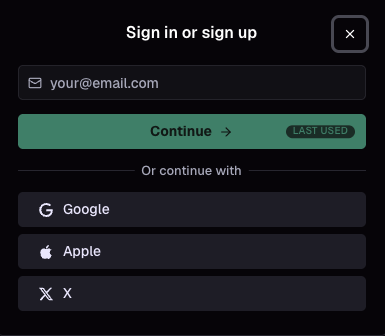
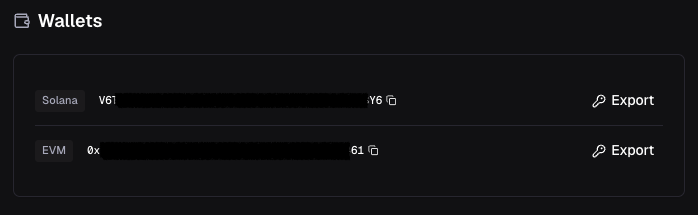
.png?alt=media)
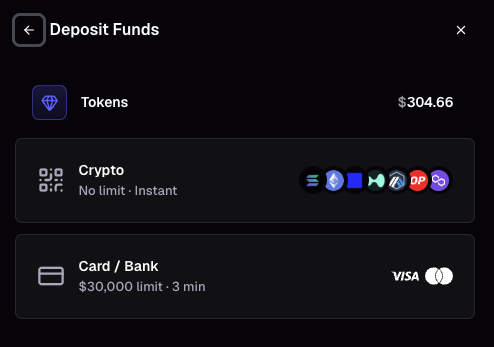
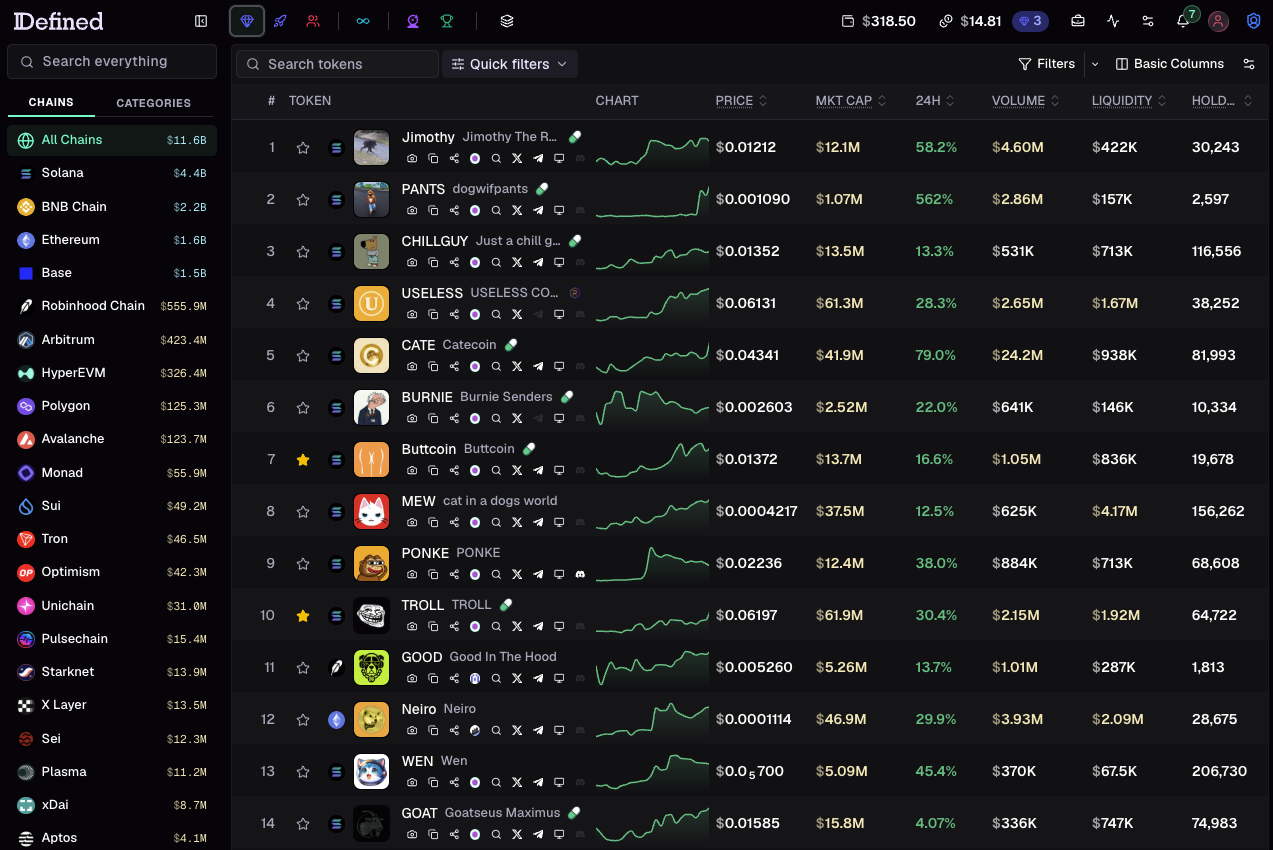
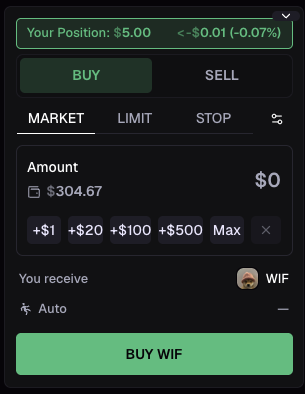
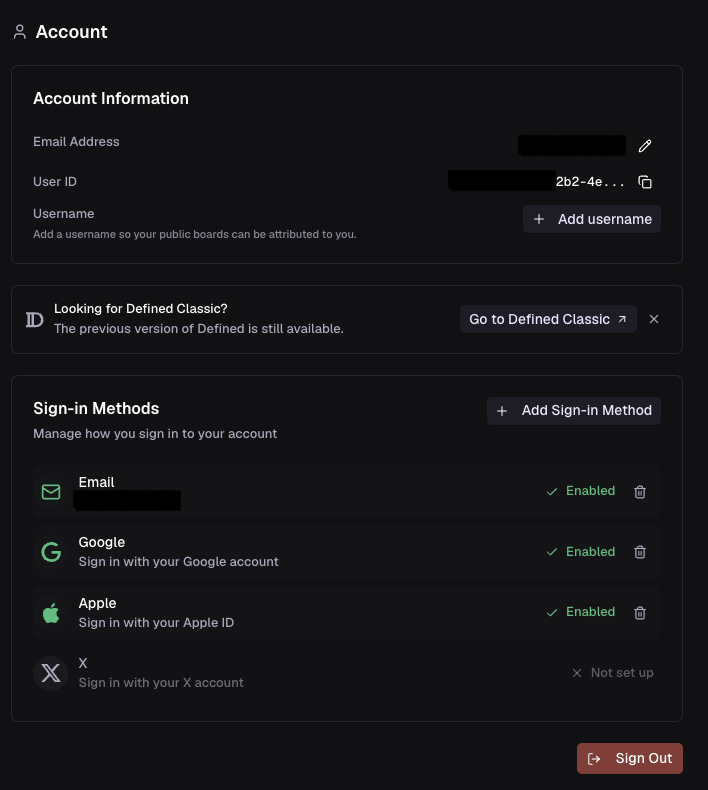
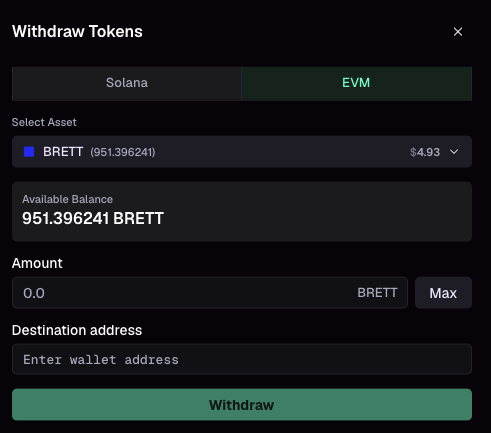
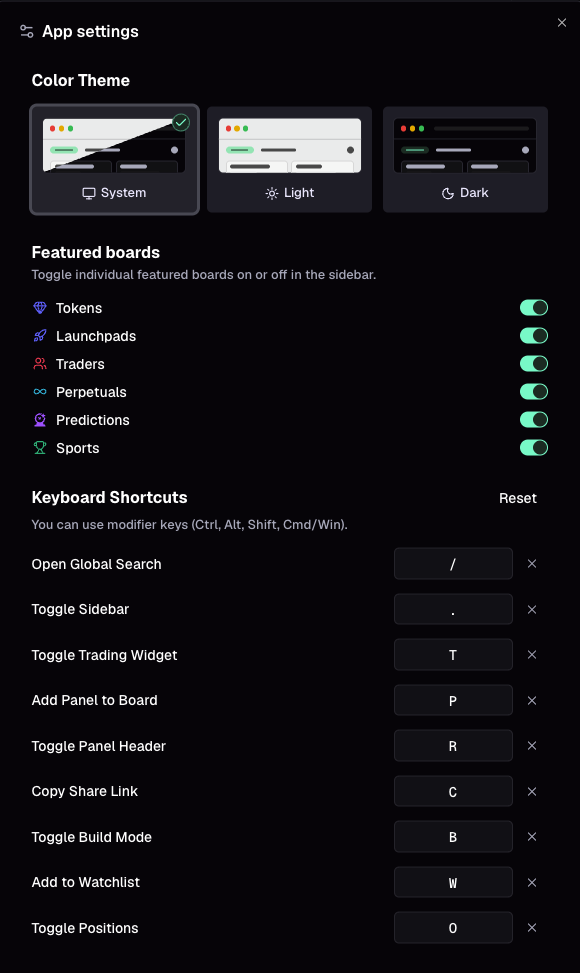
.png?alt=media)
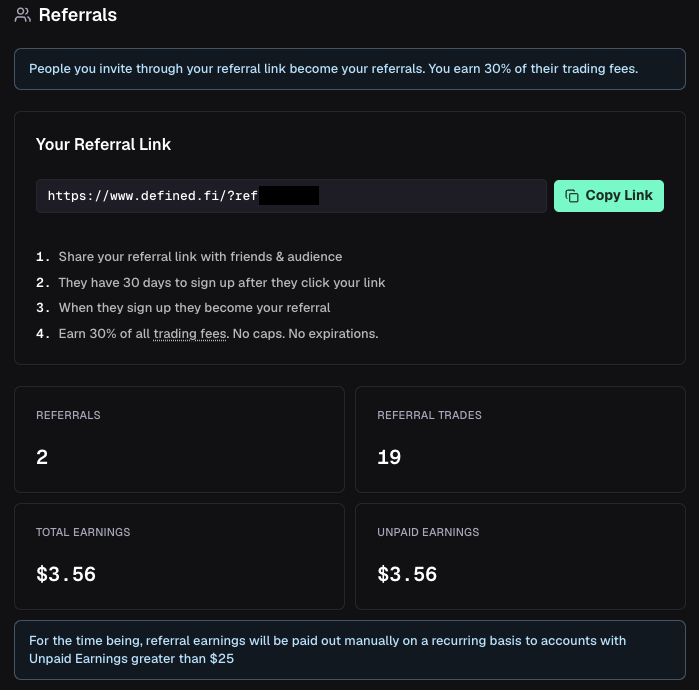
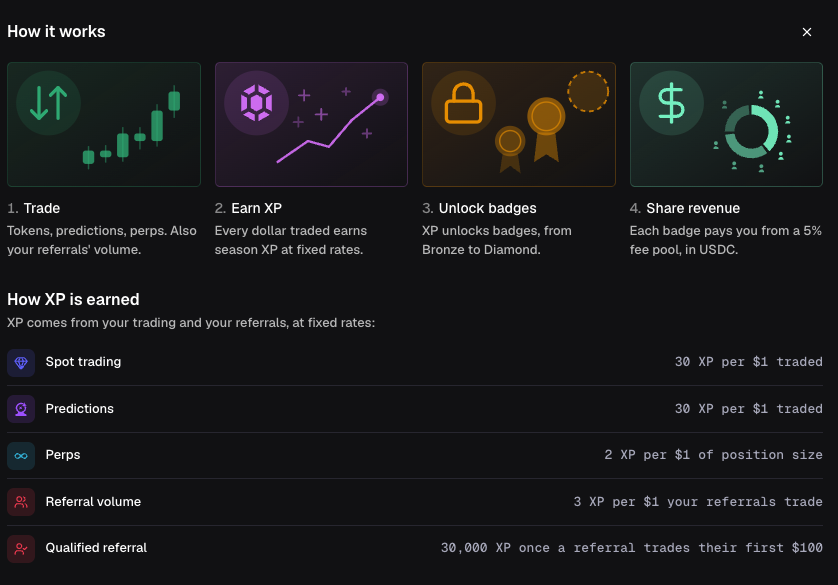


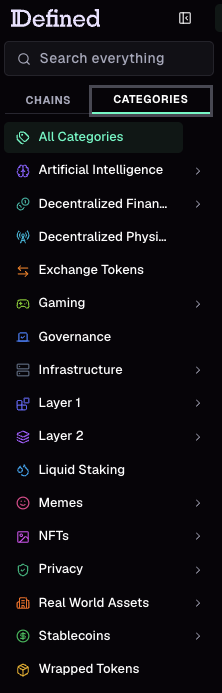
.png?alt=media)
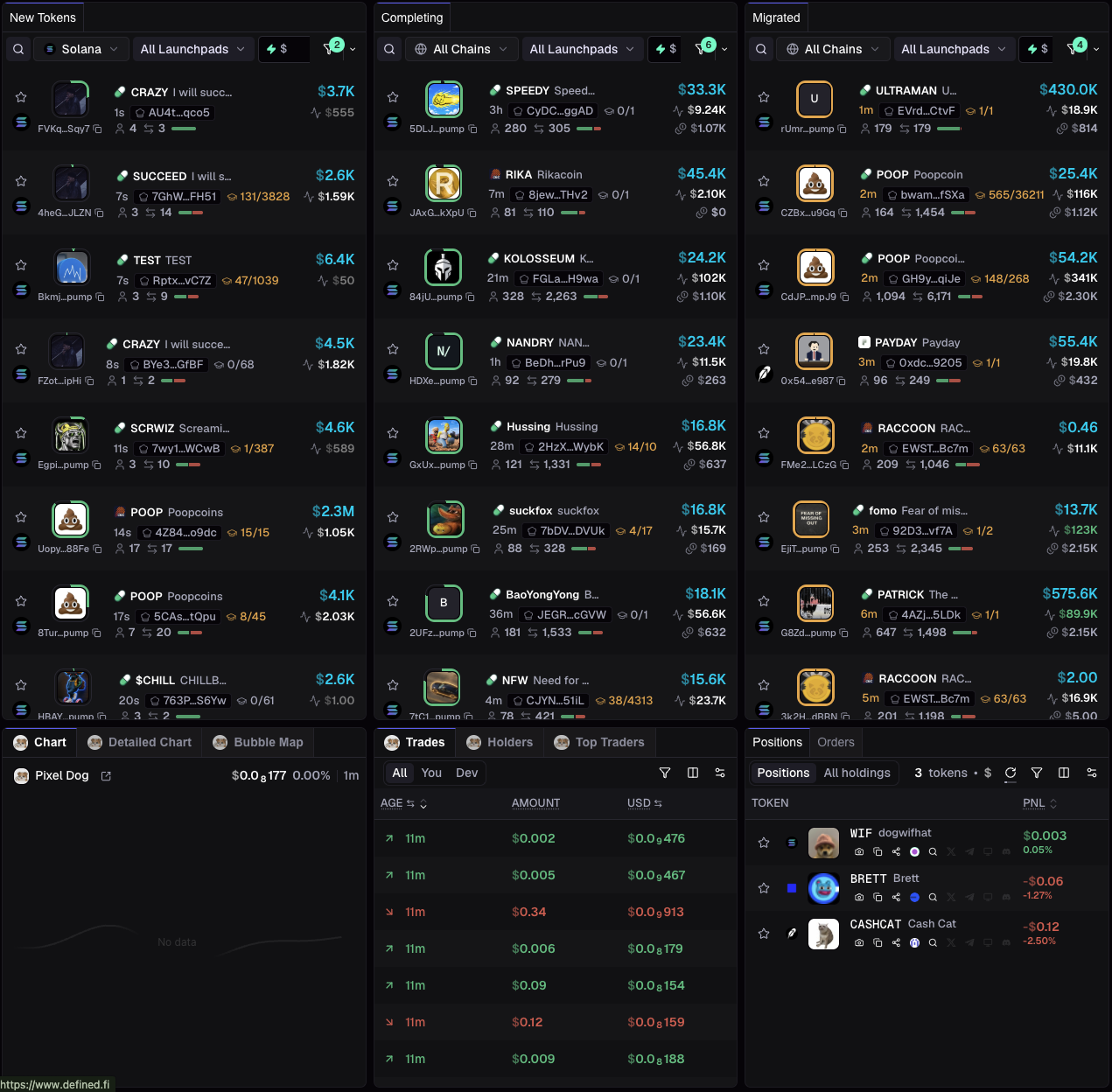
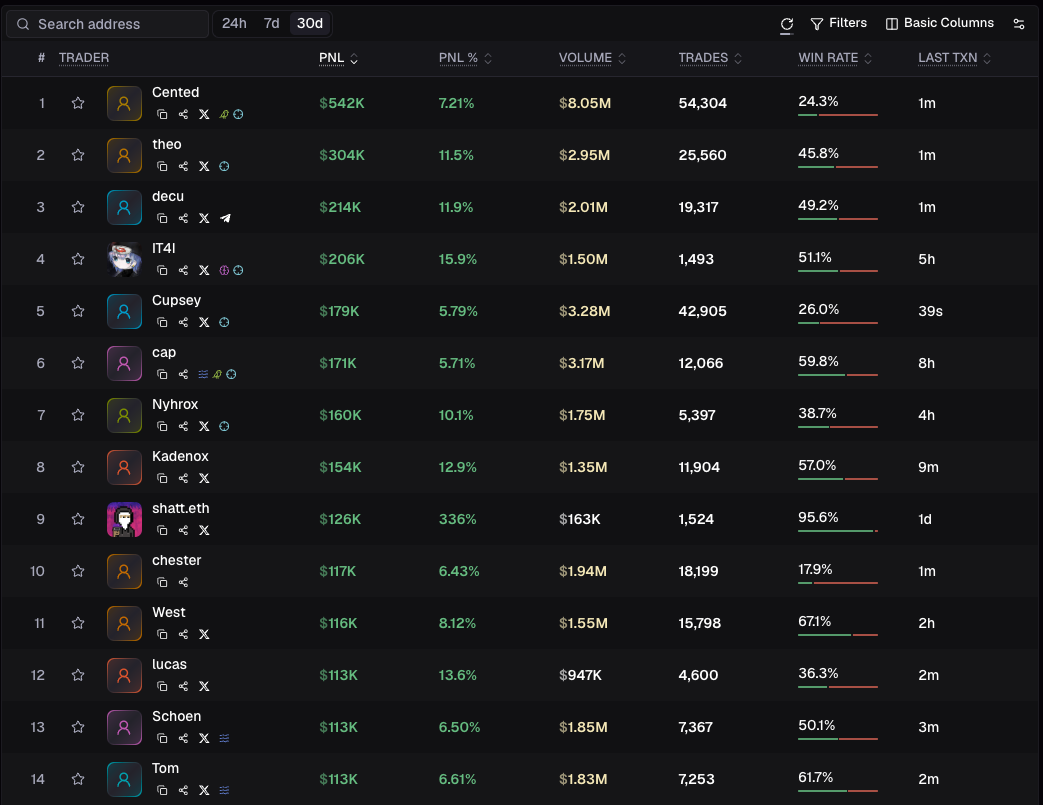
.png?alt=media)
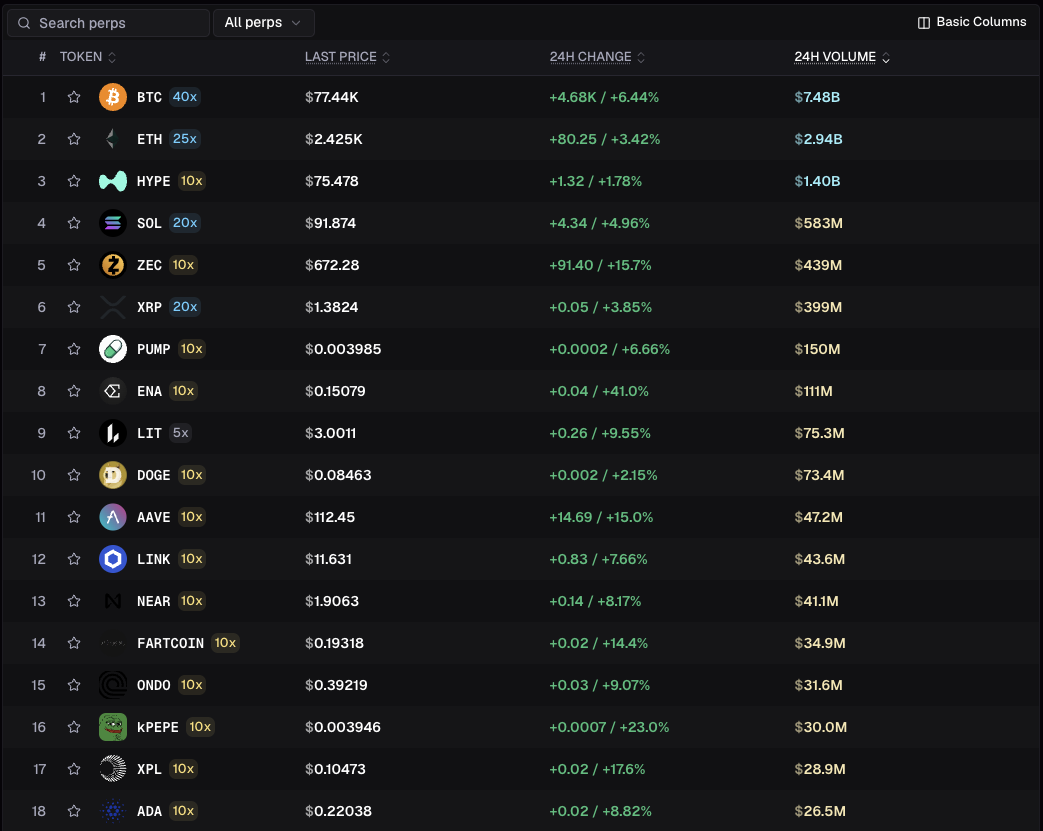
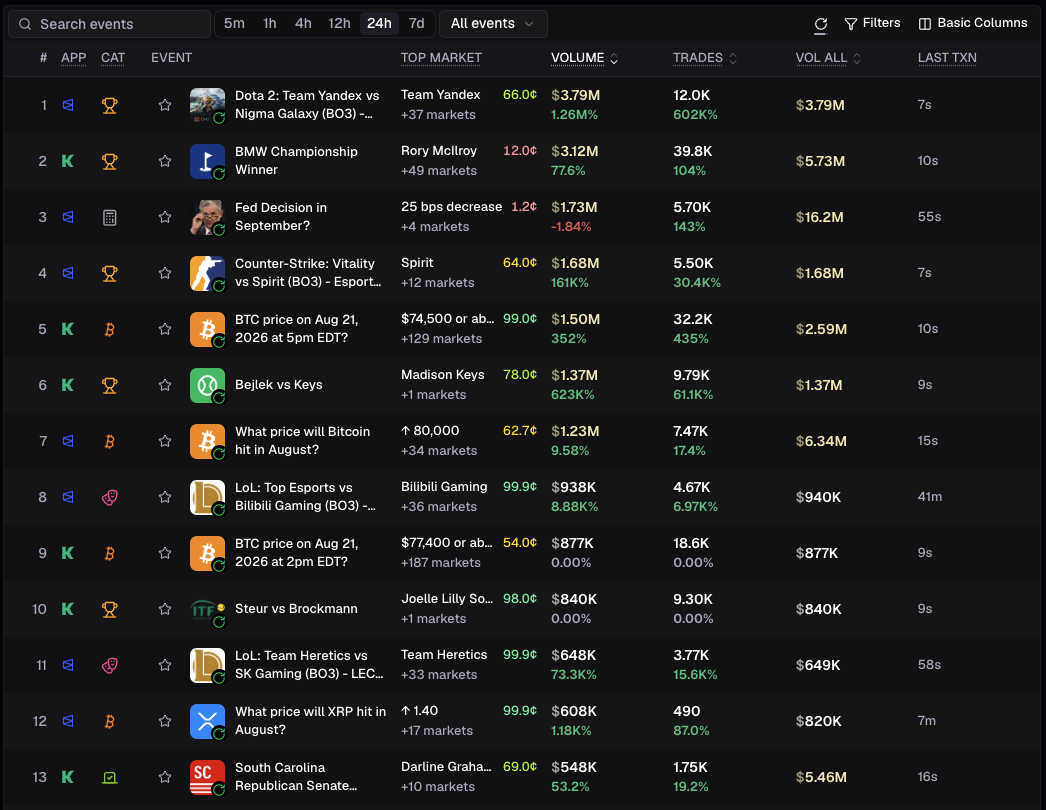
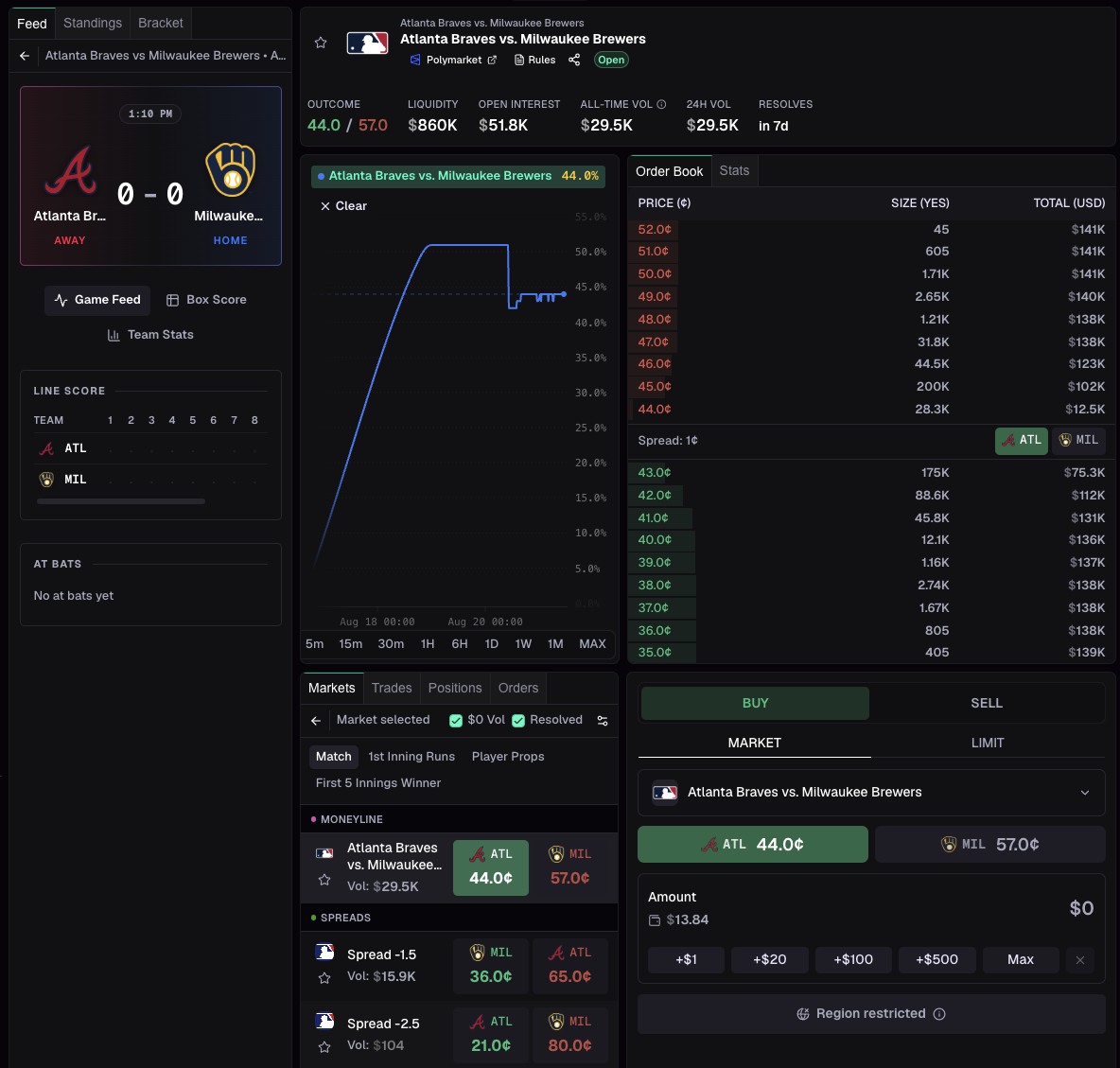
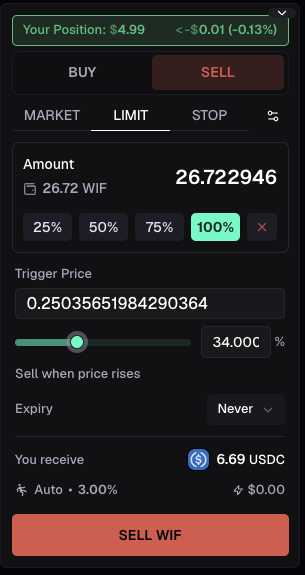
.png?alt=media)
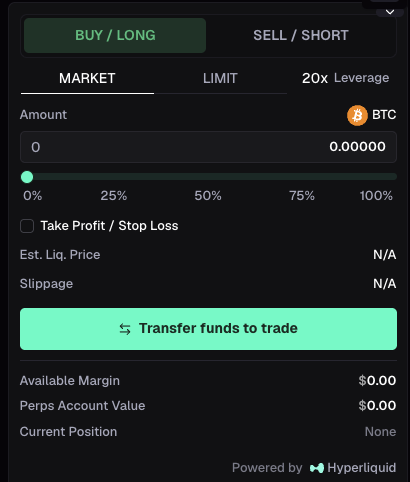
 ) any board to add it to your sidebar and see any changes made by the creator in the future.
* Save a copy of any default or community boards () to make your own changes (you will no longer see updates made by the original creator).
) any board to add it to your sidebar and see any changes made by the creator in the future.
* Save a copy of any default or community boards () to make your own changes (you will no longer see updates made by the original creator).
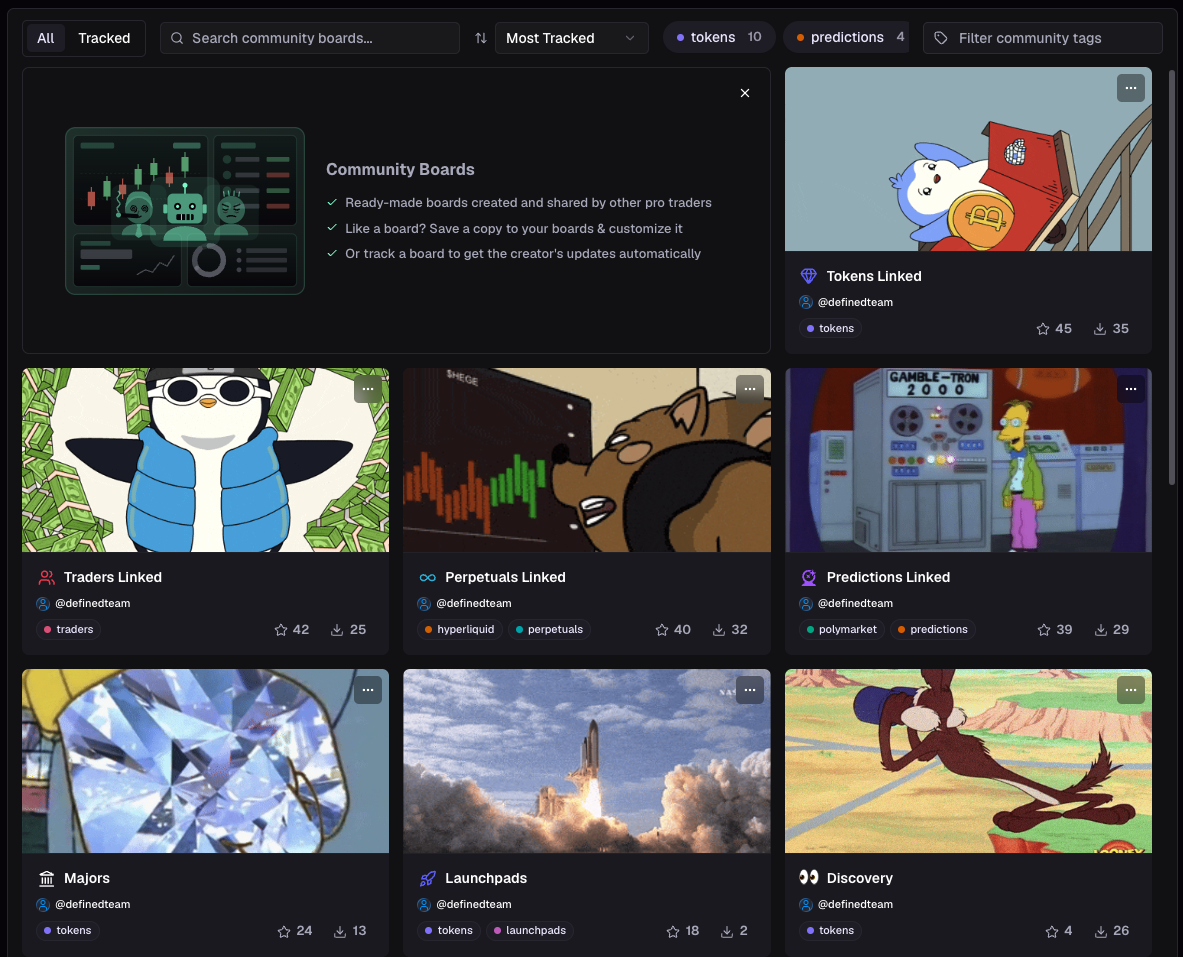
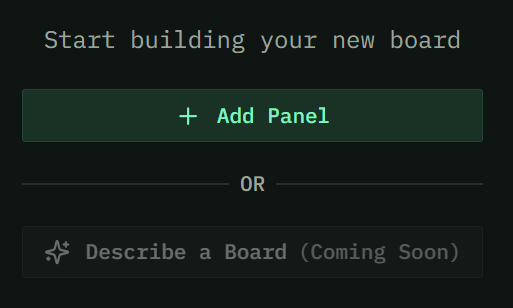
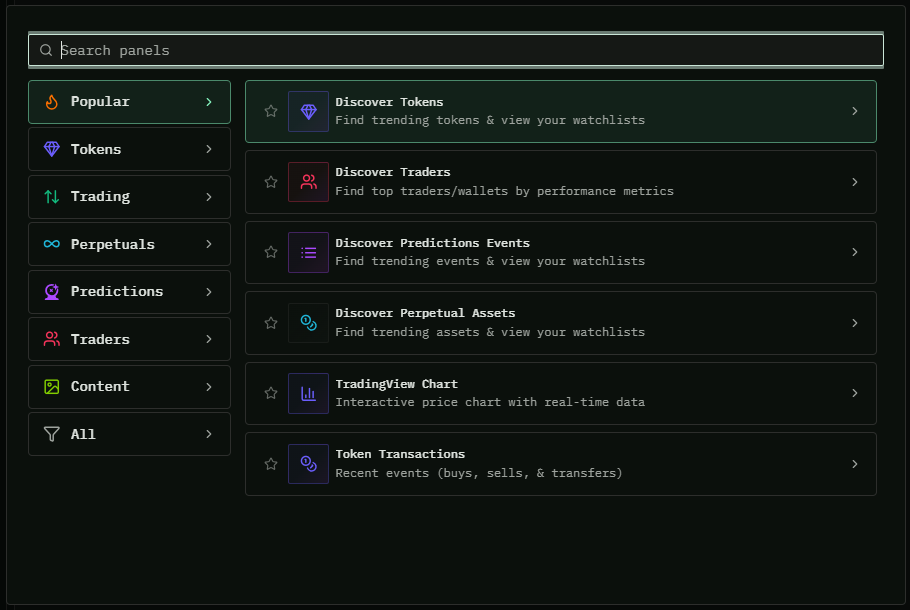
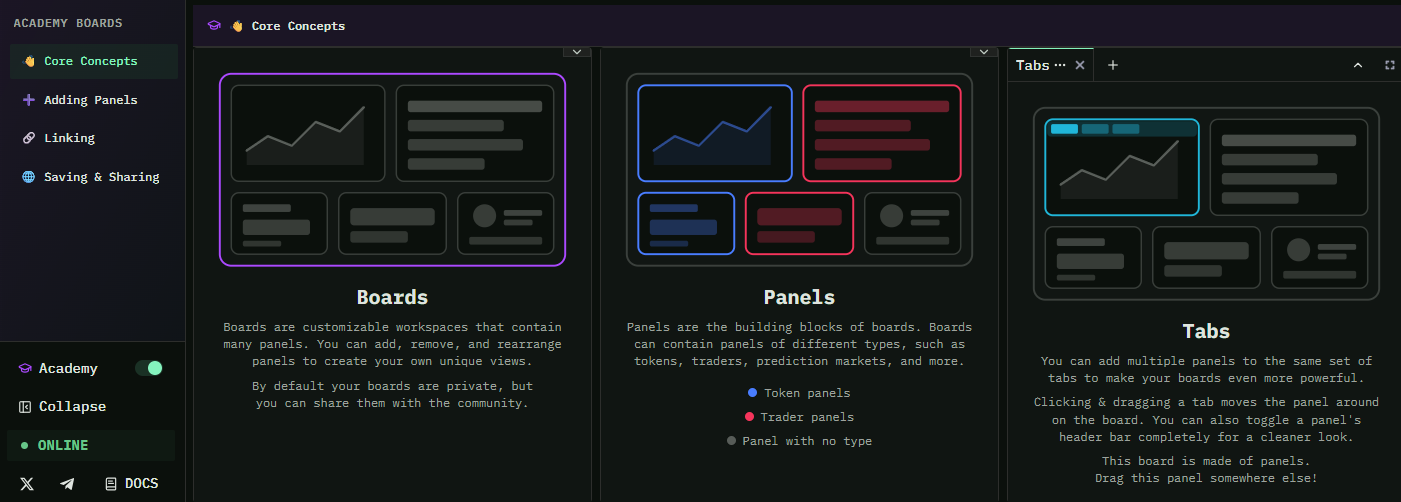

.png?alt=media&token=bdbdc024-dbf3-4711-bced-bf2ec165927d)


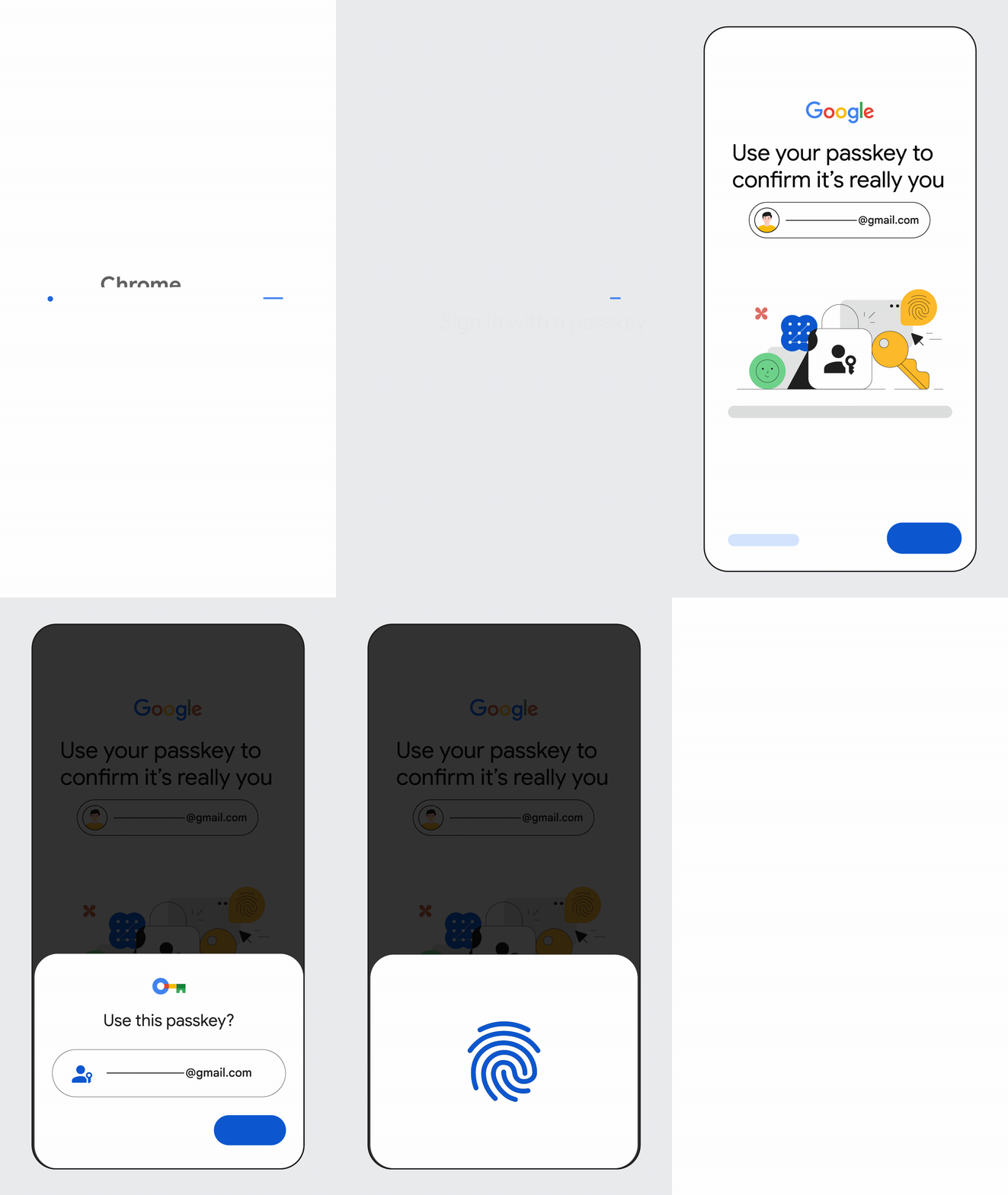


 or from the Portfolio page. Create or import additional wallets to suit your trading needs!
{% endhint %}
You can deposit additional funds at any time. To do this, select "Deposit", copy the wallet address, and paste it into the platform you wish to transfer from (eg: MetaMask, Phantom, CEX, etc.).
*Next we'll cover some other wallet management functions* 👉
# Manage Trading Wallets
Learn about our wallet management features.
To open the Defined Trading Wallets manager, select the wallet icon in the trading form on the right side of any token page (web), or at the bottom of your screen on mobile/app 👉
or from the Portfolio page. Create or import additional wallets to suit your trading needs!
{% endhint %}
You can deposit additional funds at any time. To do this, select "Deposit", copy the wallet address, and paste it into the platform you wish to transfer from (eg: MetaMask, Phantom, CEX, etc.).
*Next we'll cover some other wallet management functions* 👉
# Manage Trading Wallets
Learn about our wallet management features.
To open the Defined Trading Wallets manager, select the wallet icon in the trading form on the right side of any token page (web), or at the bottom of your screen on mobile/app 👉 . You can also open the Wallets page from the [Portfolio](https://www.defined.fi/tokens/portfolio) page.


 All visible wallets will be shown in the dropdown list in the trading panel, even those without funds. Hiding wallets will remove them from this list.


 will allow you to select which columns you want to appear on your Discover page.

 to further narrow your token results.
The example below shows a filter that will only show Solana tokens that originated on Pump.fun or Raydium LaunchLab, have had more than $20k in volume, a market cap over $15k, have at least 15 unique traders, was created within the last 4 hours, and must have a transaction in the last 5min.
to further narrow your token results.
The example below shows a filter that will only show Solana tokens that originated on Pump.fun or Raydium LaunchLab, have had more than $20k in volume, a market cap over $15k, have at least 15 unique traders, was created within the last 4 hours, and must have a transaction in the last 5min.


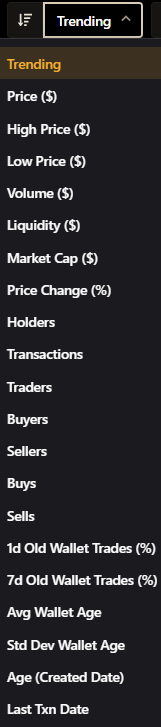

 button in the far right column.
To show hidden tokens, select "Show hidden" at the top right of the portfolio table.
## Show Portfolio on Sidebar
You can also show your portfolio on the sidebar by selecting the down arrow
button in the far right column.
To show hidden tokens, select "Show hidden" at the top right of the portfolio table.
## Show Portfolio on Sidebar
You can also show your portfolio on the sidebar by selecting the down arrow next to "Portfolio" on the left-side menu:
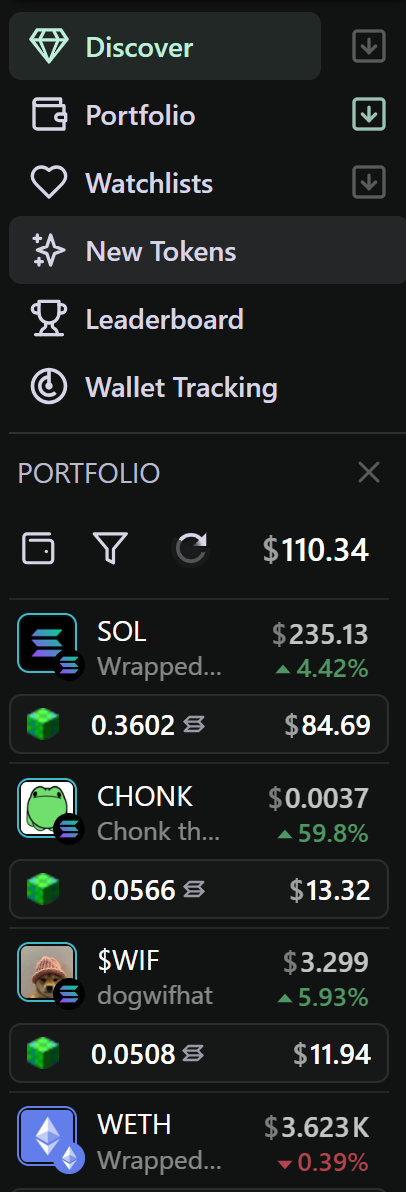
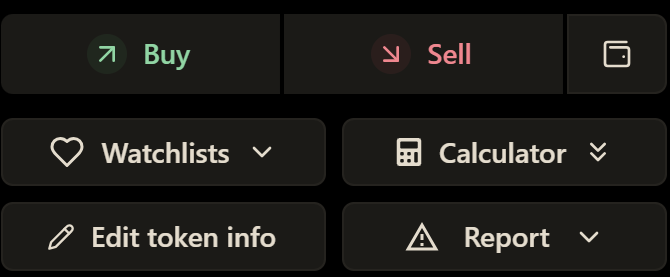

 next to the Watchlist menu button.

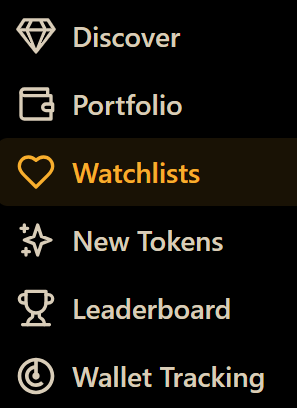


 Paste your DEX Screener public watchlist URL, give it a name and icon, and hit "Import".

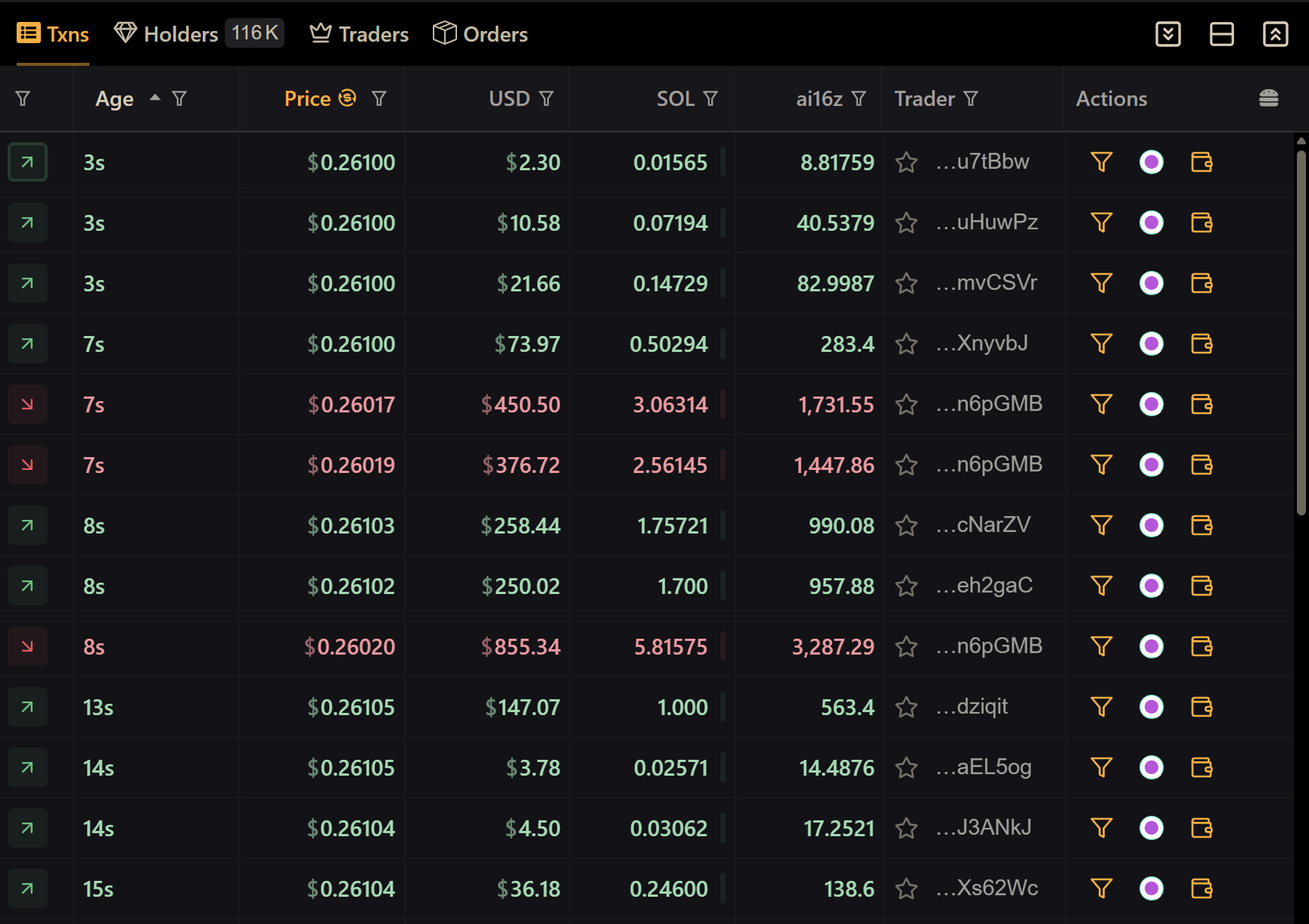
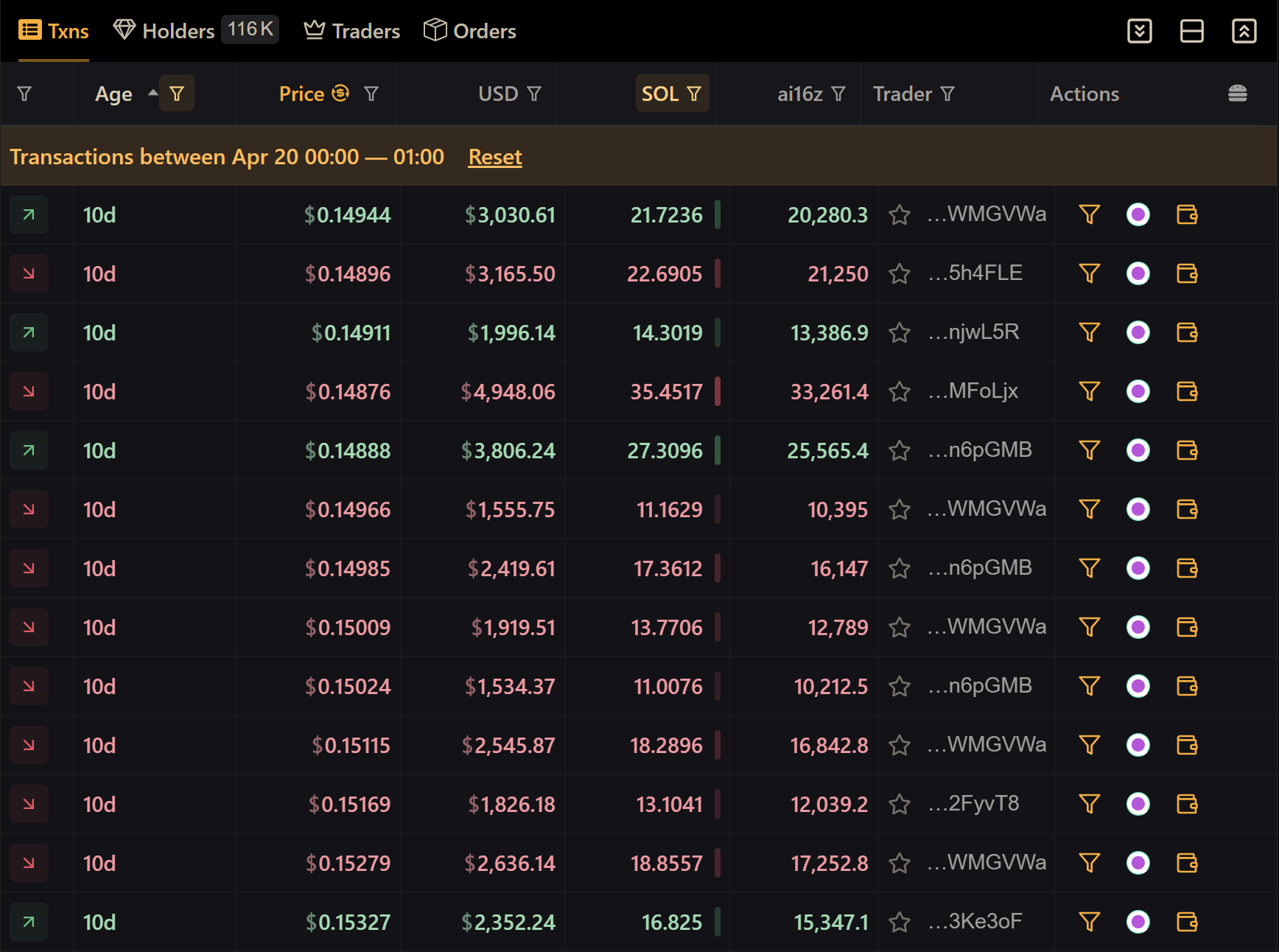
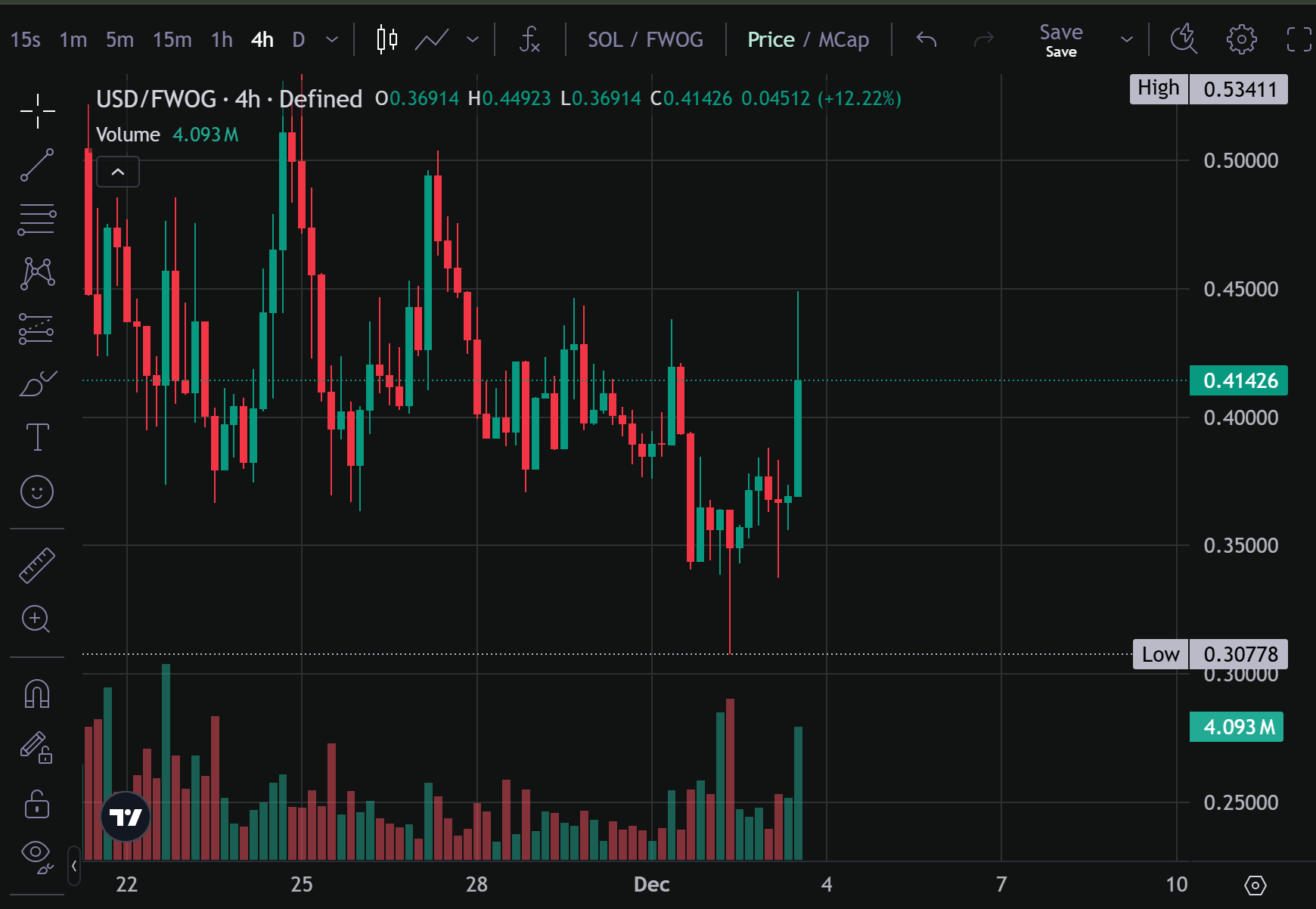
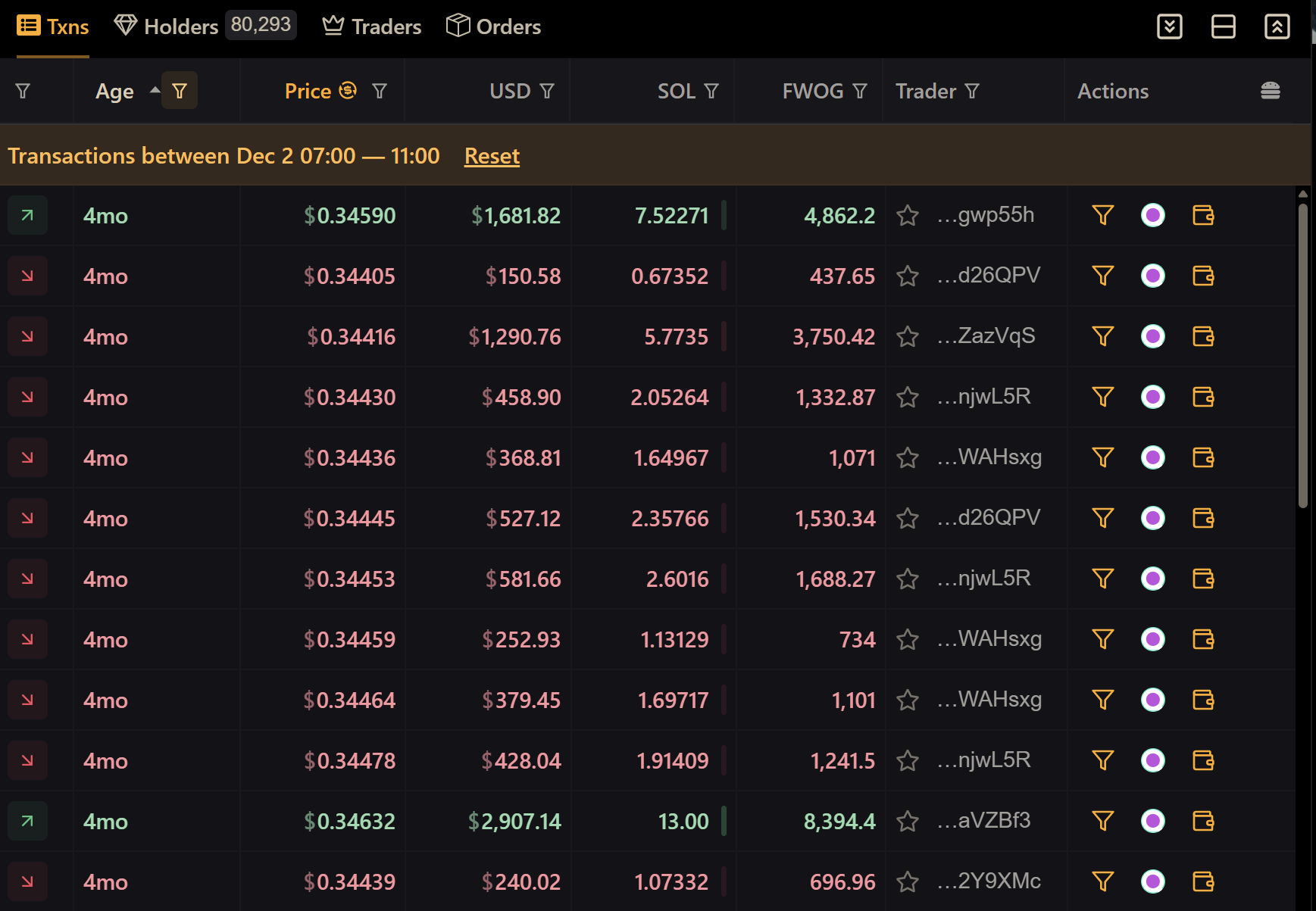
 next to their transaction in the far right column. In the next section, we'll talk more in depth about Wallet Tracking.
# Wallet Tracking (Traders)
Managing Tracked wallets on Defined
Navigate to the [Traders page](https://www.defined.fi/traders/discover?selectedTab=Tracking) from the main menu to access Wallet Tracking: 
Wallet tracking provides users with a clear and detailed view of all transactions associated with specific wallets. Benefits include:
* Identifying token swaps, approvals, and other activities.
* Staying informed about wallet behavior in real-time.
* Following smart traders, whale wallets, or other influential accounts.
* Analyzing wallet activity patterns to detect the latest trends in the market.
next to their transaction in the far right column. In the next section, we'll talk more in depth about Wallet Tracking.
# Wallet Tracking (Traders)
Managing Tracked wallets on Defined
Navigate to the [Traders page](https://www.defined.fi/traders/discover?selectedTab=Tracking) from the main menu to access Wallet Tracking: 
Wallet tracking provides users with a clear and detailed view of all transactions associated with specific wallets. Benefits include:
* Identifying token swaps, approvals, and other activities.
* Staying informed about wallet behavior in real-time.
* Following smart traders, whale wallets, or other influential accounts.
* Analyzing wallet activity patterns to detect the latest trends in the market.

 2. Select "Add Trader", enter the address, give it a name, and add any optional labels to the wallet (eg: Early Pepe Buyer, Whale, Good PnL, etc.).\
\
Select "Start Tracking", or, see step 3 for advanced settings.
2. Select "Add Trader", enter the address, give it a name, and add any optional labels to the wallet (eg: Early Pepe Buyer, Whale, Good PnL, etc.).\
\
Select "Start Tracking", or, see step 3 for advanced settings.


 in the "Trader" column as shown below. When pressed, it will prompt for a wallet name and optional labels just like in step 4 above.

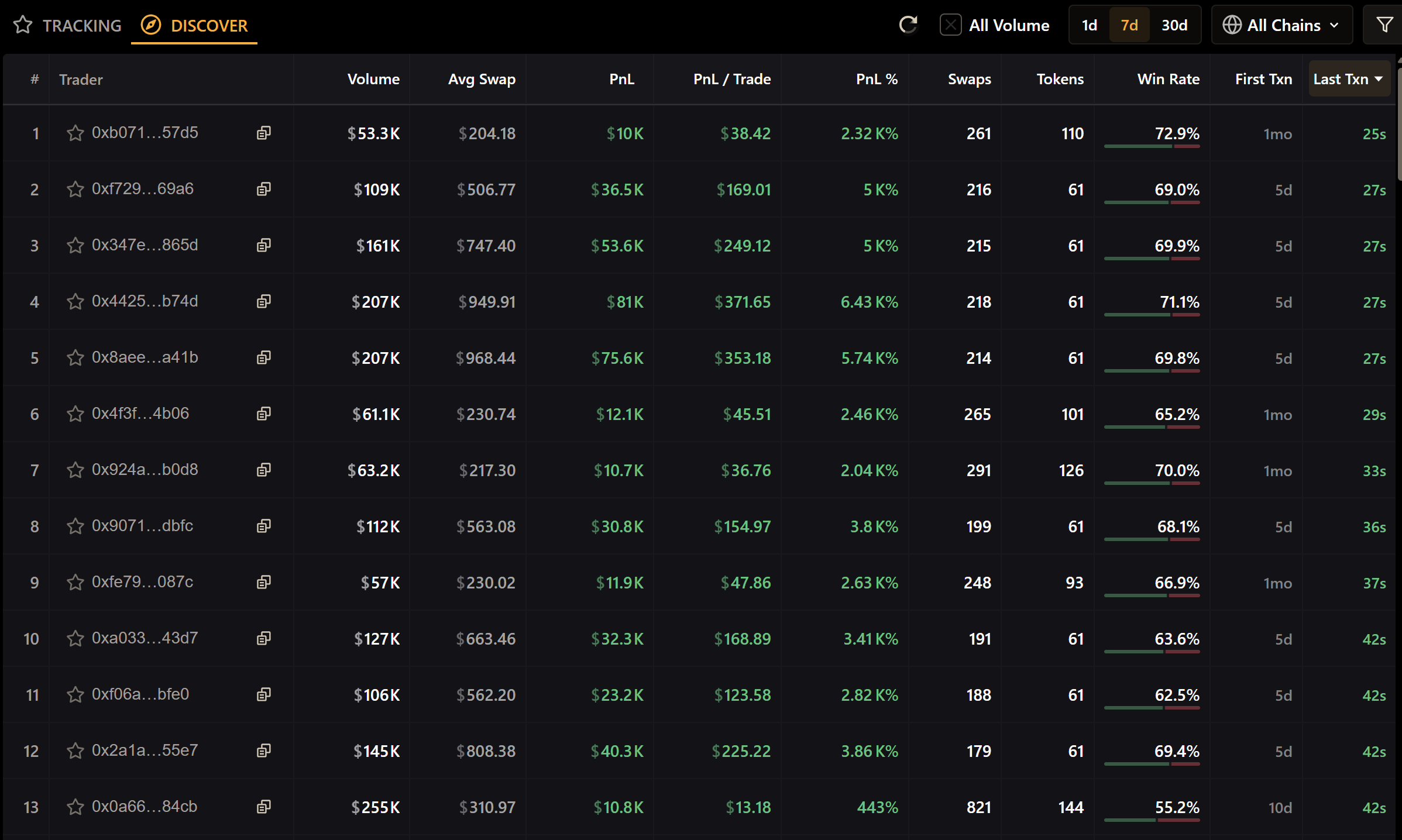
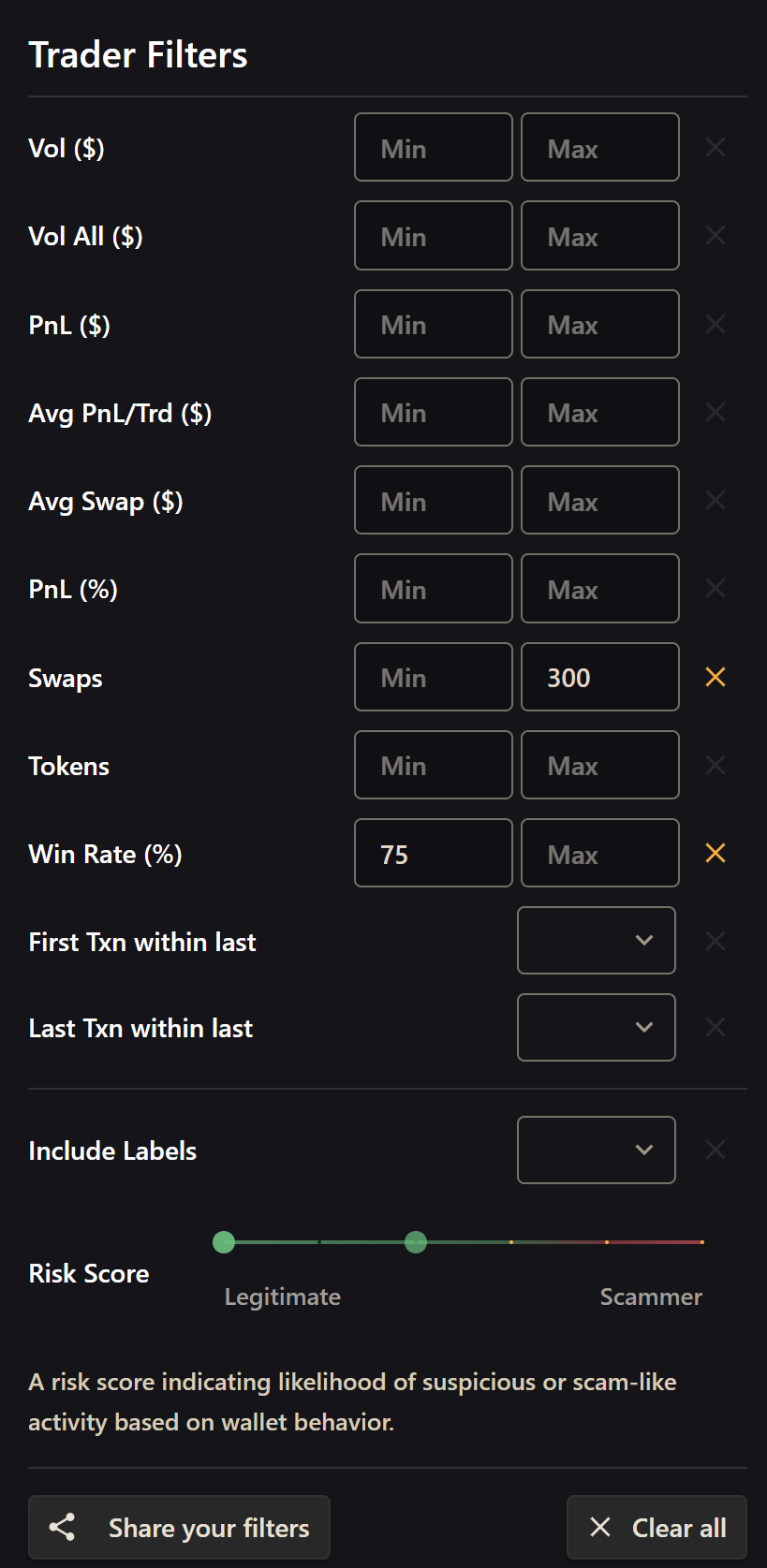



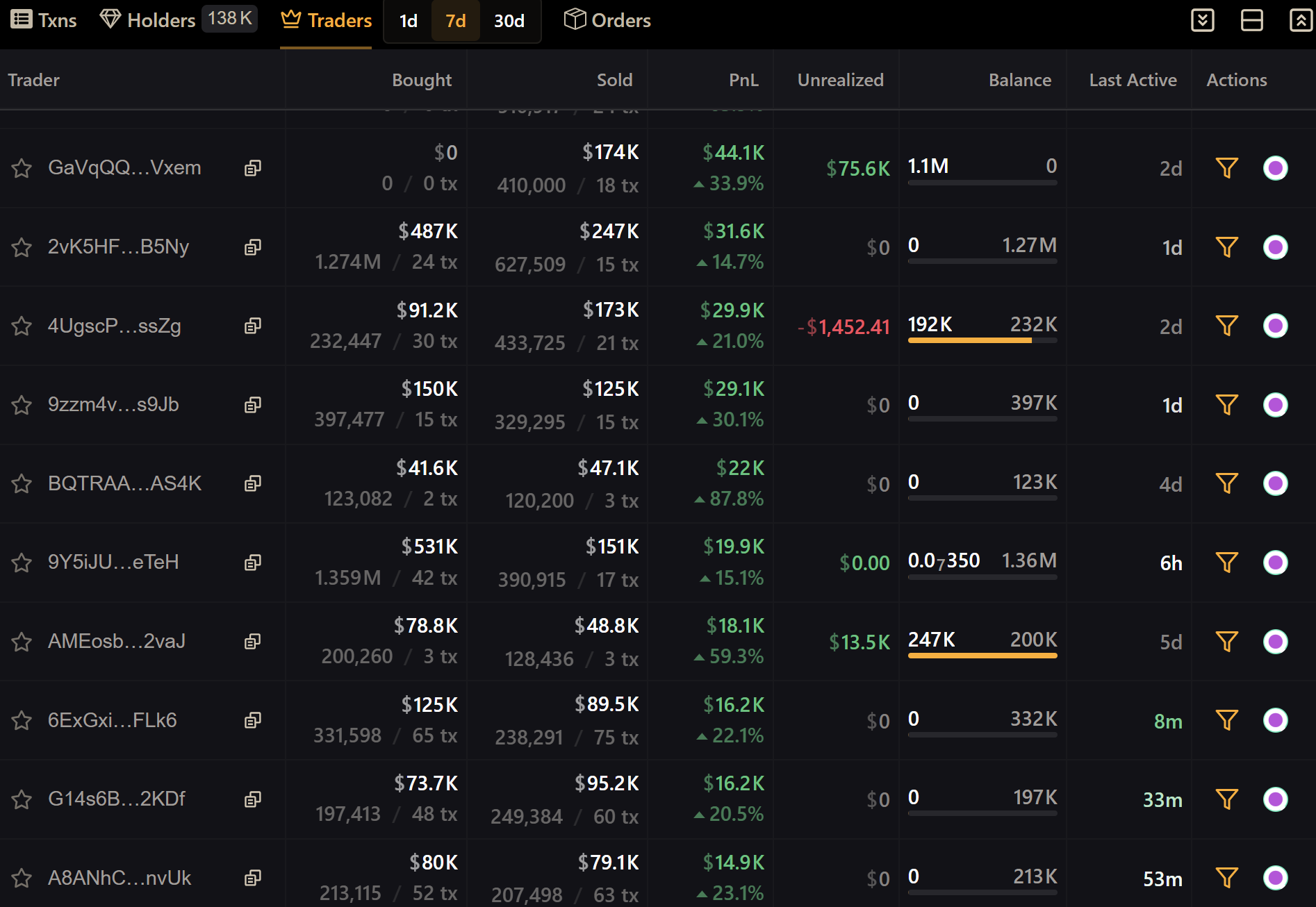
 next to the wallet address.
# Holders Summary
Quickly see top holders of any token
Selecting the "Holders" section of the transaction table allows you to get an at-a-glance view of all holders of a particular token, their % of supply held, amount, and total value (USD).
Viewing top holders is a useful way of checking the total distribution of a token (how much supply is held and by how many wallets) so you can make an informed decision when trading.
next to the wallet address.
# Holders Summary
Quickly see top holders of any token
Selecting the "Holders" section of the transaction table allows you to get an at-a-glance view of all holders of a particular token, their % of supply held, amount, and total value (USD).
Viewing top holders is a useful way of checking the total distribution of a token (how much supply is held and by how many wallets) so you can make an informed decision when trading.

 next to the wallet address to receive notifications in Telegram when they buy/sell any tokens.
# Edit Token Info
Token info or links incorrect? Find a Scam? Submit a change!
At Defined, we don't believe in charging users or token devs to edit token information. This includes things like social links, circulating marketcap, token images, and more.
## How Do I Submit a Change?
To submit a proposal to edit token images or information, select the "Edit token info" button, which you can find just below the trading panel.
next to the wallet address to receive notifications in Telegram when they buy/sell any tokens.
# Edit Token Info
Token info or links incorrect? Find a Scam? Submit a change!
At Defined, we don't believe in charging users or token devs to edit token information. This includes things like social links, circulating marketcap, token images, and more.
## How Do I Submit a Change?
To submit a proposal to edit token images or information, select the "Edit token info" button, which you can find just below the trading panel.