> For the complete documentation index, see [llms.txt](https://docs.defined.fi/llms.txt). Markdown versions of documentation pages are available by appending `.md` to page URLs; this page is available as [Markdown](https://docs.defined.fi/defined-docs/readme/quick-start-guide.md).

# Quick Start Guide

Set up your account and understand the basics

{% stepper %}
{% step %}

### Create Your Account

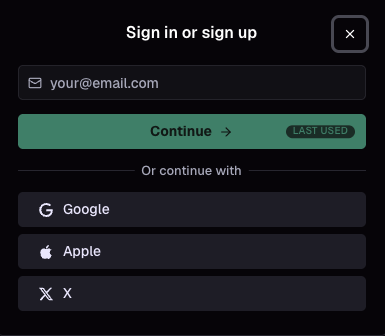
You can create your account by logging in via email, Google, Apple, or X.

<figure><img src="https://1684109365-files.gitbook.io/~/files/v0/b/gitbook-x-prod.appspot.com/o/spaces%2F-MVOXpj9hcGfNWdz-V48%2Fuploads%2Fgit-blob-767d06ea4868ab2fd3670a9643202353053b58bc%2Fsign-in%20preview.png?alt=media" alt=""><figcaption><p>You can add additional methods at a later time</p></figcaption></figure>

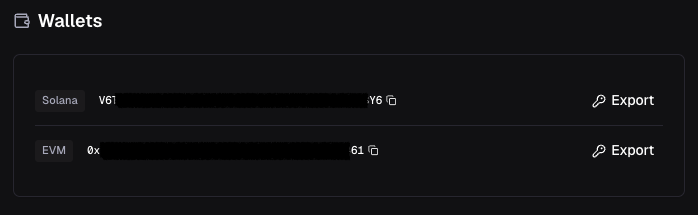
Once logged in, an EVM and Solana wallet are generated for you.

<figure><img src="https://1684109365-files.gitbook.io/~/files/v0/b/gitbook-x-prod.appspot.com/o/spaces%2F-MVOXpj9hcGfNWdz-V48%2Fuploads%2Fgit-blob-44be208190ec67a332c5c9a4e3a6169c29e22a7e%2Fwallets%20preview.png?alt=media" alt=""><figcaption><p>You may export the private keys for each wallet at your discretion. Do not share these with anyone.</p></figcaption></figure>

{% hint style="info" %}
Your Defined account is also linked to the Defined Mobile app (iOS/Android), with the same wallets. Your cash balance is shared between both platforms.
{% endhint %}
{% endstep %}

{% step %}

### Fund Your Account

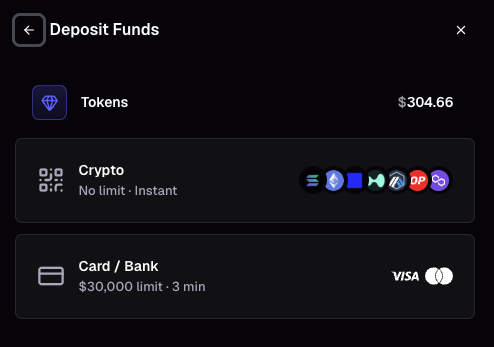
To deposit funds for token trading, select the wallet icon (![](https://1684109365-files.gitbook.io/~/files/v0/b/gitbook-x-prod.appspot.com/o/spaces%2F-MVOXpj9hcGfNWdz-V48%2Fuploads%2FEhuOTiT9VNC6mS5GlwFV%2Fimage.png?alt=media\&token=48e6d67d-cdeb-470f-a9ec-bab90838bdb7)) on the nav bar and select "Add funds" to start the deposit flow. We use Relay to handle a "Cash Balance" on your account to simplify trading across all networks. Your account's cash balance is held as USDC on Solana (regardless of what network you send from) and is also available for trading when you login on the Defined Mobile app. Whenever you sell a token, you will receive USDC on Solana.

<figure><img src="https://1684109365-files.gitbook.io/~/files/v0/b/gitbook-x-prod.appspot.com/o/spaces%2F-MVOXpj9hcGfNWdz-V48%2Fuploads%2Fgit-blob-0315dbdbd66b630ef93f1da4da0fc5721192b796%2FWallet%20quick%20view%20(top%20nav%20bar).png?alt=media" alt=""><figcaption><p>Your cash balance and wallet live in the top nav bar</p></figcaption></figure>

<figure><img src="https://1684109365-files.gitbook.io/~/files/v0/b/gitbook-x-prod.appspot.com/o/spaces%2F-MVOXpj9hcGfNWdz-V48%2Fuploads%2Fgit-blob-b363dc9e2ea5cad369cbcce10f47fe615ca89457%2FDeposit%20Funds.png?alt=media" alt=""><figcaption></figcaption></figure>

**About Deposits:**

* If you initiate a crypto deposit and send yourself USDC (on any network) we will automatically convert it to USDC on SOL.
* If you deposit via Moonpay you'll receive USDC on SOL.
* If you send any other base token (Eth, Solana, etc.) to your Defined wallets via "Deposit Crypto" it will remain as that token in your portfolio.
* You will have the option to convert non-USDC tokens in your portfolio, or you can manually sell those tokens on Defined, and they will convert to USDC to fund your cash balance.

{% hint style="info" %}
Perpetuals & Predictions have region restrictions and are traded with funds separate from your Cash Balance. Follow the "Deposit" prompts on those respective trading panels to transfer funds from your Cash Balance for trading on these markets (either Hyperliquid or Polymarket).
{% endhint %}

**Funding Recommendation:**

Sending USDC on Solana is the best way to fund your Cash Balance and avoid small conversion fees. You can deposit USDC from any network and we will auto convert to USDC on Solana through the deposit flow on web/mobile.
{% endstep %}

{% step %}

### Discover Trending Tokens

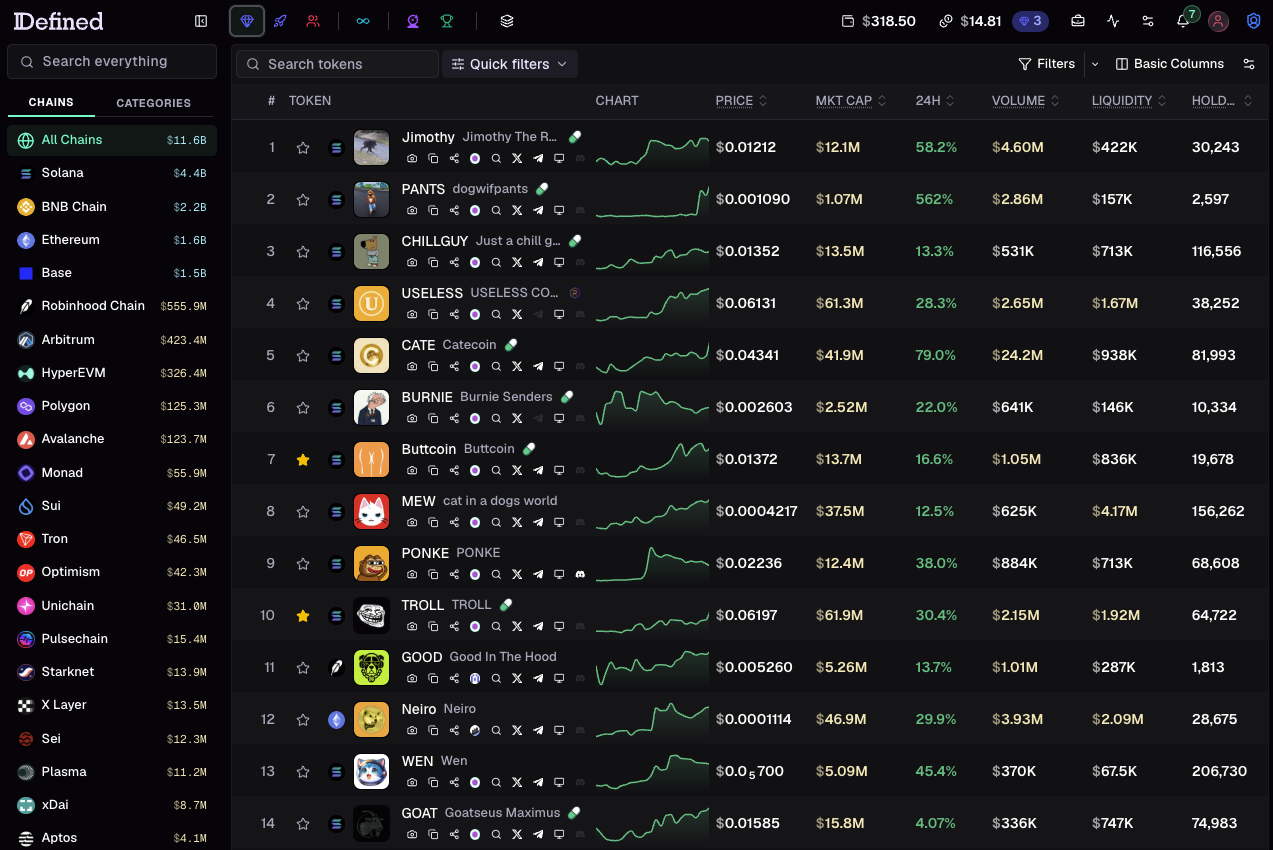
Open the [Tokens dashboard](https://defined.fi/tokens?utm_source=defined\&utm_medium=docs\&utm_campaign=quick-start-guide) to see what's trending right now. Trending is driven entirely by on-chain activity, so tokens rank by real trading, not paid placement. Filter by network, timeframe, and preset (Trending, Volume, Gainers, New), or browse by category to find opportunities in a theme.

<figure><img src="https://1684109365-files.gitbook.io/~/files/v0/b/gitbook-x-prod.appspot.com/o/spaces%2F-MVOXpj9hcGfNWdz-V48%2Fuploads%2Fgit-blob-261913058422a00937e547c3a8e2b1ff6ca57dc7%2FTrending%20Tokens%20Dashboard%20preview.png?alt=media" alt=""><figcaption><p>The Tokens dashboard is your starting point for discovery</p></figcaption></figure>

Click any token to open its full profile with chart, transactions, holders, and a trade panel. Use the search bar at the top to jump to any token by name, symbol, or contract address across 80+ million tokens on 40+ networks.
{% endstep %}

{% step %}

### Make Your First Trade

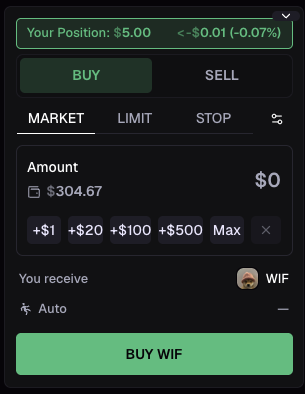
Once your cash balance is funded, trading a token takes seconds. Open any token, enter your spend amount in the buy panel (orders start at $5), and hit "Buy" for an instant market order. You can also set limit and stop orders and adjust slippage from the same panel.

<figure><img src="https://1684109365-files.gitbook.io/~/files/v0/b/gitbook-x-prod.appspot.com/o/spaces%2F-MVOXpj9hcGfNWdz-V48%2Fuploads%2Fgit-blob-e675d824a4b4aa9b8b6c65eeca78eea0c8a81b7d%2Ftrade%20panel%20buy%20plus%20position.png?alt=media" alt=""><figcaption><p>Buy panel with your current position</p></figcaption></figure>

All trades settle in USDC on Solana, and you can trade across any supported chain without bridging. For a full breakdown of order types, fees, and gas, see the [Trading](/defined-docs/readme/trading.md) page.
{% endstep %}

{% step %}

### Explore More Markets and Features

Token trading is just the start. From the left sidebar you can also trade [Perps](/defined-docs/readme/discovery-and-search/perps.md), [Predictions](/defined-docs/readme/discovery-and-search/predictions.md), and Sports, track top [Traders](/defined-docs/readme/discovery-and-search/traders.md), and manage your [watchlists](/defined-docs/readme/discovery-and-search/tokens.md#watchlists).

Prefer a fully customizable, multi-panel layout? Advanced users can build [custom Boards](/defined-docs/readme/introduction-to-boards.md) that combine discovery, charts, trading, and more into a single view.
{% endstep %}
{% endstepper %}