# Tokens (Trending Page)

Defined's "Tokens" page is our main landing page where you will find all the top trending tokens across all chains. Our trending algorithm is based on pure data; No paid trending boosts here!

If you need to navigate back to our trending tokens page, select "Tokens" from the main menu 👉![](/files/0xtd66xT13cXzFshhgJV)

<figure><img src="/files/eWzEK20EnIuezzGNNfI8" alt=""><figcaption><p>Example of "Trending" on our Discover page</p></figcaption></figure>

Our Tokens page can be fully customized to what's important to you, with powerful filters and customized columns.

## Column Selector

On the top right, the settings button <img src="/files/OFUk6Q13pMUj1jsQ2ECt" alt="" data-size="line"> will allow you to select which columns you want to appear on your Discover page.

<figure><img src="/files/zFp6H8ErhmpDxuZqjIMc" alt=""><figcaption></figcaption></figure>

## Powerful Filtering Options

Additionally, we have many filters <img src="/files/JtPhIlnnSbke3zqvo3jn" alt="" data-size="line"> to further narrow your token results.&#x20;

The example below shows a filter that will only show Solana tokens that originated on Pump.fun or Raydium LaunchLab, have had more than $20k in volume, a market cap over $15k, have at least 15 unique traders, was created within the last 4 hours, and must have a transaction in the last 5min.

<figure><img src="/files/7KbmfEHB6UspucgYW2s8" alt=""><figcaption><p>Filter example</p></figcaption></figure>

## Save Custom Filters

If you've created a filter you like, you can select the "+ Custom" along the top bar to save it for future use.

<figure><img src="/files/tgsdgzIEbto8mAAtbL43" alt=""><figcaption></figcaption></figure>

## Sorting Options

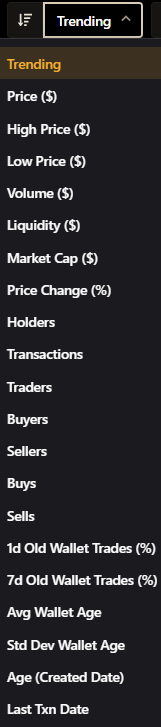
Aside from our default options to sort results, such as Trending, Volume, Gainers, etc, you can also sort by any column metric on demand, in ascending or descending order.

<figure><img src="/files/xiCQNVJghLNGV3pNTDcE" alt=""><figcaption></figcaption></figure>


---

# Agent Instructions: Querying This Documentation

If you need additional information that is not directly available in this page, you can query the documentation dynamically by asking a question.

Perform an HTTP GET request on the current page URL with the `ask` query parameter:

```
GET https://docs.defined.fi/defined-docs/defined-classic/defined-features/tokens-trending-page.md?ask=<question>
```

The question should be specific, self-contained, and written in natural language.
The response will contain a direct answer to the question and relevant excerpts and sources from the documentation.

Use this mechanism when the answer is not explicitly present in the current page, you need clarification or additional context, or you want to retrieve related documentation sections.